I have not upgraded my UHK60 firmware since the UHK80 came out, and still manage using an older agent.
Is it recommended to upgrade or leave?
If I have a UHK80 Keyboard setup, can I import that into uhk60 and it it will just “lose” the extra keys?
I have not upgraded my UHK60 firmware since the UHK80 came out, and still manage using an older agent.
Is it recommended to upgrade or leave?
If I have a UHK80 Keyboard setup, can I import that into uhk60 and it it will just “lose” the extra keys?
Is it recommended to upgrade or leave?
For maximum stability it is recommended to remain on 11.2.x.
If I have a UHK80 Keyboard setup, can I import that into uhk60 and it it will just “lose” the extra keys?
Yes as long as they are on compatible UserConfig versions.
Actually we don’t remove the extra keys from the config so you should be able to share one config between your uhks back and forth.
@kareltucek If 11.2 is the most stable version for UHK 60, is it possible to state that inside UHK Agent? I was unaware of this
To be clear, the above recommendation is my honest personal recommendation, and it is meant as “if total stability is a must for you, then go for 11.2.x”, not as “13.x firmware is unusable, please don’t upgrade”.
(My experience is that it is usable without issues, although I am occasionally getting some crashes which I haven’t bothered to start tracking down so far… but indeed should, so thanks for the head ups!)
Regarding what is or is not stated in the Agent, that is up to @mlac.
On the bright side, the most pressing uhk80 reliability issues have been resolved, so I can dig into noncritical issues. Please feel free to pester me about anything that should be working and is not.
Decided to bite the bullet and move to one Agent version and 13.x on the UHK60.
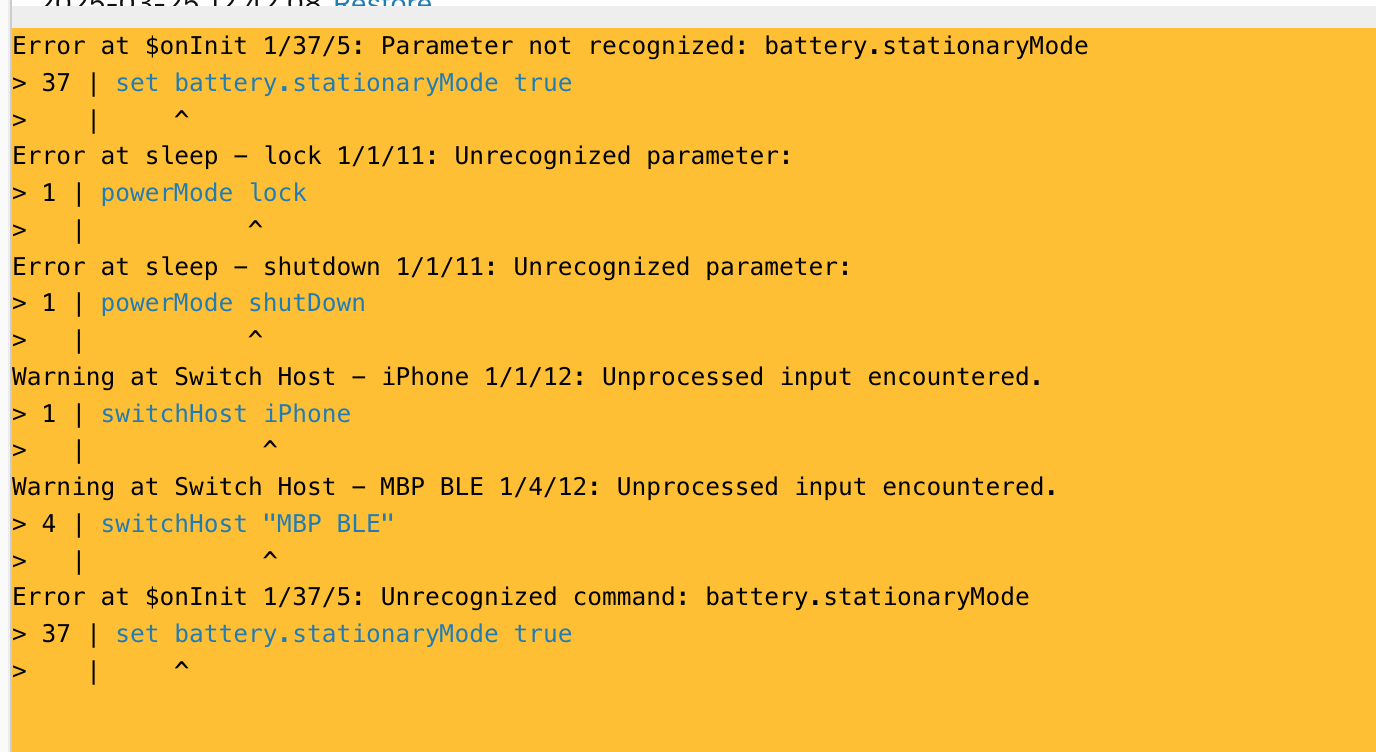
Any views on how to handle the below in Agent? When using a UHK80 configuration on a UHK60?
For what it’s worth, I’ve been upgrading agent & firmware on my 60v2 and have seen no degradation. But my configuration is rather simple with only a handful macros.
@kareltucek Is there any way to detect in a macro whether it is running on a UHK80 or UHK60? Detect whether there are batteries connected? Whether the keyboard has wireless connectivity?
Any views on how to handle the below in Agent? When using a UHK80 configuration on a UHK60?
The switch host warnings are a bug → Fix warnings on switchHost macros with uhk60. by kareltucek · Pull Request #1212 · UltimateHackingKeyboard/firmware · GitHub
The rest of the functionality is only available on the battery_management branch, so my guess is that you have flashed master build.
(Also, we are renaming the stationary mode to set battery.chargeLimit optimizeHealth.)
@kareltucek Is there any way to detect in a macro whether it is running on a UHK80 or UHK60? Detect whether there are batteries connected? Whether the keyboard has wireless connectivity?
No. No. No.
Ah you are completely right, that is what I did. battery_management on UHK80, master on UHK60!
But there is determining hardware configuration of UHK from macros · Issue #780 · UltimateHackingKeyboard/firmware · GitHub .
Feel free to throw related requests there!
Very handy being able to share the config between the two now alright!
A year later. Is the current Agent and firmware now as stable like the 4.2.1 and 11.x combo? That is for the UHK60 only use – no UHK80 support needed at all. Why should I upgrade or is there no real reason to do so?
Much expanded macros.
Thanks, and the stability is now on par with the old versions?
I alternate between my UHK60v2s and my UHK80.
I do not have any stability issues.
Firmware 16.2.0 works pretty well on my UHK60v2 – together with current Agent.
I gave my UHK to my son, but got it back, because he did not use any of the special features of the keyboard and in the end preferred a 75 %. I flashed the new firmware and will see how it goes 
”Pretty well” implies good, but not perfect btw. Which problems are still lingering?
Well, there are some minor issues with suspend-wake and high-res scrolling (which has been added somewhere in 12.x). Namely, high-res scrolling doesn’t re-initialize correctly after waking from suspend on some systems, resulting in extremely slow scrolling. However, we believe that we are following the standard correctly and the issue is with host systems.
We have been through a round of crash hunting, which made us aware esd-induced crashes, but there is no reason to believe that current firmware is affected more than 11.2.x. We just are now aware of them, and we now know that we have no other type of crashes, which is a good thing.
On the dark side, we have been adding lots of code and been refactoring lots of code, which definitely means new bugs. Current code is event-driven, yielding more efficient processing, which however is also more complex and so prone to subtle, but possibly critical bugs. Uhk60 is no longer a sole passenger on this ride.
On the bright side, my user experience is that uhk60 is rock stable, and most of my trust issues are actually projected from the more finicky features of uhk80 (such as bluetooth).
Given this, I would say that current firmware is stable, but its reliability expectations are backed by its development dynamics, which predicts some amount of volatility, while 11.2 is backed by long periods when code didn’t change much, while also being solidly tested by our community.
The firmware on UHK60 is stable and works well.
On UHK80, there are still some bluetooth issues (but that doesn’t affect the UHK60).
The options for some of the new features (e.g. some HRM settings) cannot be directly managed from the Agent UI but have to be set in macros e.g.
set secondaryRole.advanced.acceptTriggersFromSameHalf false
As @kareltucek mentioned, high-res scrolling seems to sometimes have issues when the host comes back from sleep or hibernation. A quick reboot of the keyboard fixes this.
It’s certainly working well for daily use.
Thanks for the detailed answer Karel and Max!
I am now on the latest firmware. Just a small correction for Max:
I never got Bluetooth working good on the UHK60