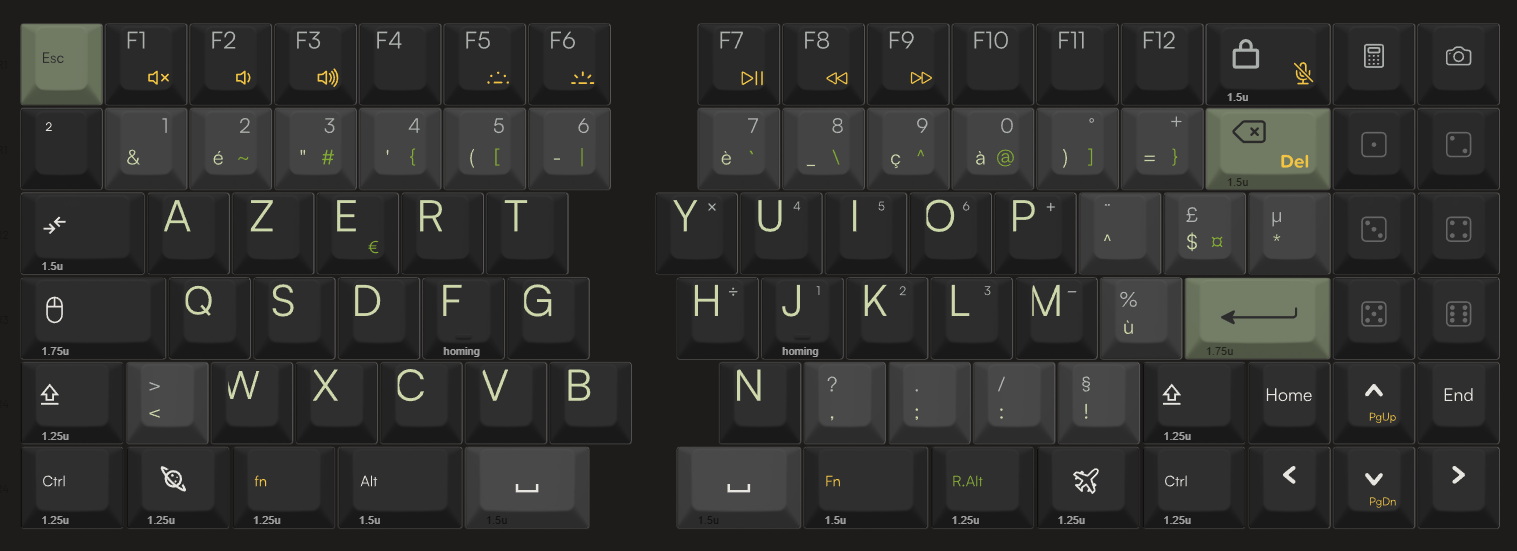
I just ordered my first split, UHK80. So i’m new to the family, and can’t wait to put my hand on this new baby.
As it is my first split, i decided to keep my azerty habit to start (yes, i know, azerty is weird, but hey, i’m french, i’m weird, it’s cultural).
Thus, i’m preparing my own layout on YUZU.
I have several questions.
Azerty users, any interesing feedback, somehting i may have not anticipated ?
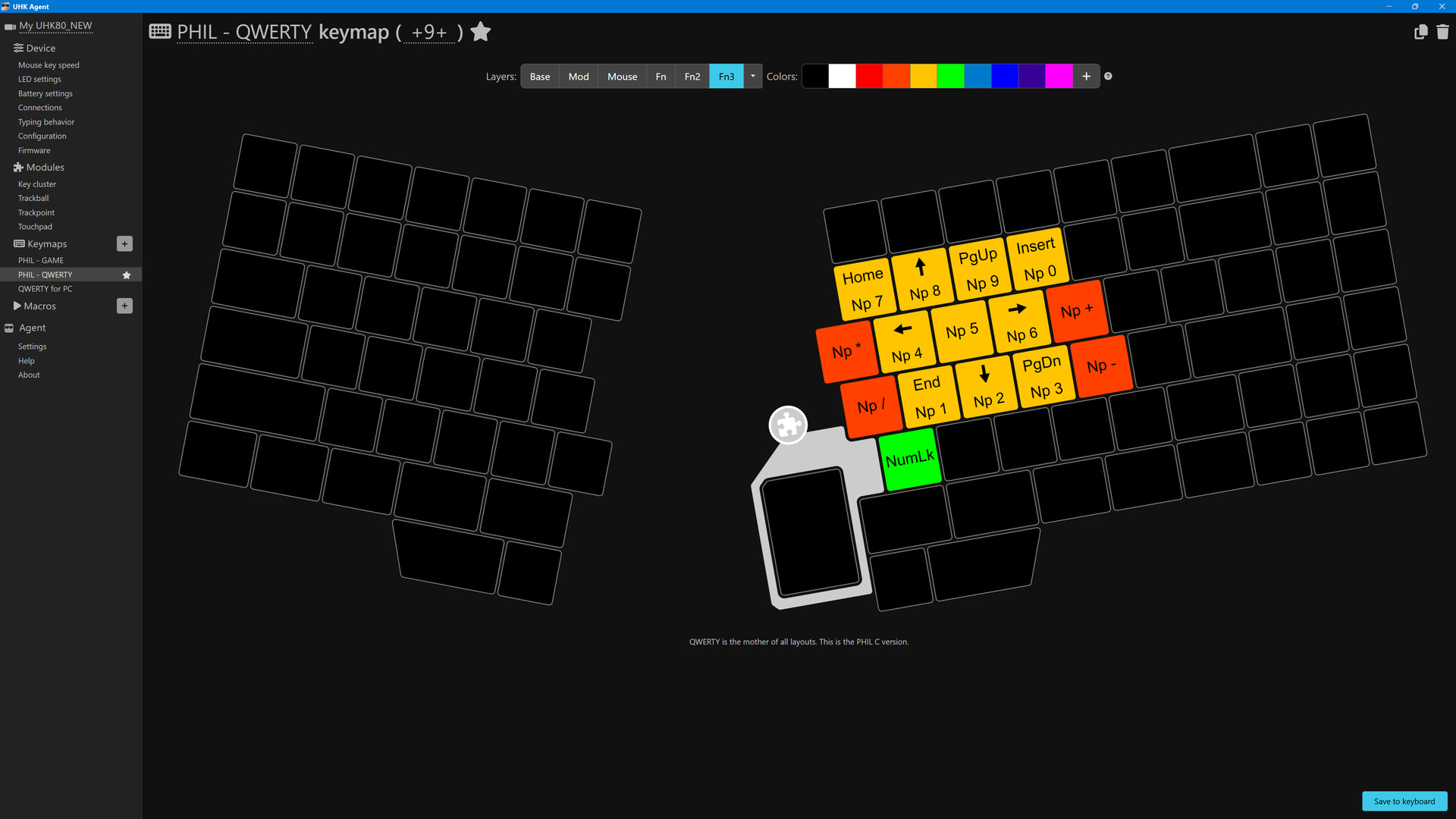
I will create several layout, but there is something i’m not sure i can do about the leds. Imagine my numpad layout (right side, Y and H rows), can i have numbers with one color (lets say yellow), and the signs around (+ / - *) in an other color (lets say orange) ? In other words, how much can i customize led per key ?
Finally, the dices keys on the right are meant to be macro dedicated. I have ideas already, but i’m sure i’ll spend weeks tweaking and modifying macros, so i don’t want to customise the keys rn. Is it possible to order just those 6 keys later (or a “pack”, not just one key, as i saw it was not possible to change a single key, if i’m right) ?
Lastly, if you have any interesting sources about the keyboard, feel free to share. I’m new here, i have a lot to learn
Yuzu has a very active Discord with a healthy AZERTY channel. I’d go there for any Yuzu questions in general. You can find a link to the Discord on their About Yuzu page.
I’m not sure what you mean regarding LEDs? The Yuzu keycaps are opaque, and thus you won’t see the LEDs through them, like the stock UHK’s double-shot keycaps. You’ll only see an underglow below the caps, and a faint bit of glow inside them if you set the LED brightness very high. The LEDs can only produce one color at a time (per-key). So even if the Yuzu caps were shine-through, you couldn’t have different colors simultaneously displaying in different areas on the same key. The different colored legends you have in your Yuzu layout image will be dye-sublimated ink that’s printed on opaque PBT caps. You can have as many different colors/legends as you want, but again, they won’t be illuminated (much) by the LEDs.
Yuzu has a sister site, FK custom, that does shine-through keycaps, but they’re transparent ABS caps that are PU coated in one solid color (black or white). Then a shine-through legend is produced by lasering off the coating in the shape of the legend. Those will still only show one color at a time for the entire key, depending on the UHK’s LED settings.
Yuzu has a minimum order of ten keycaps. However, you can add extra caps to your main UHK layout if you want to try a few options in the meantime . I’m pretty sure it’s only a dollar or two per cap, so I always order a few more just in case. It beats paying a ton of shipping/fees ordering only a few. If you’re unsure how the colors will look in contrast to each other, you can order some color samples (free shipping) to help you decide.
My advice is to take your time, and wait until you’ve actually had your hands on the keyboard for a couple of weeks before ordering new caps. Also, in case you didn’t know, the UHK uses OEM profile keycaps, and the Yuzu caps have two profile options (Cherry and KAM). Since you’re an AZERTY user, I’m sure you probably know the different rows are different heights/sculpts for Cherry and OEM. I suggest using a flat, uniform profile so you can interchange some caps between rows if you decide to alter your layout later. Yuzu’s KAM are a uniform height profile, and FK custom has XDA.
Thanks a lot for your detailed answer. And directions !
Regarding the LEDs, I’m not looking for shine-through keycaps I’m really not a fan of that “Christmas-tree-ish” look, to be honest. And you’re right, I wasn’t very clear about that part. I’m perfectly fine with the LED / keycaps system used on the UHK80, but I’m not completely sure how the under-key color customization works.
What I’d like to do is light up specific keys depending on the layer I’m using. For example, illuminate the numpad keys when I switch to that particular layer. As far as I know, this should be possible, but I’m unsure about how far the customization can go. For instance, on the numpad layer: numbers in yellow and symbols like +, –, /, * in orange, just to make everything easier to distinguish from my viewing angle and avoid pressing the wrong key.
If i can do this, all good. If not, maybe i’ll take this into consideration in my keycaps customisation (just to have some visual cues)
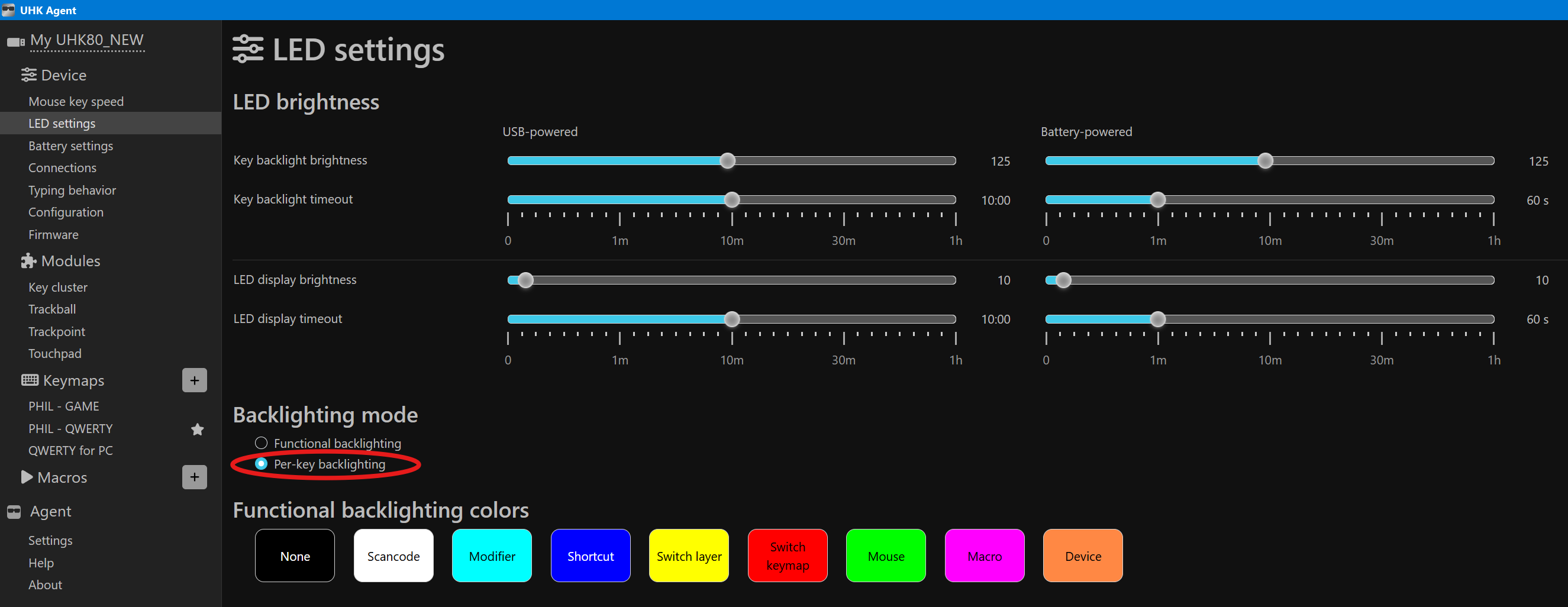
Then you can choose any color per-key, and use different colors for the same key, depending on the keymap/layer. So for example, your base AZERTY layer could be all white keys, but when switching to the layer containing your numpad keys, maybe you want any unused keys unlit, but numpad to look something like:

 . I’m pretty sure it’s only a dollar or two per cap, so I always order a few more just in case. It beats paying a ton of shipping/fees ordering only a few. If you’re unsure how the colors will look in contrast to each other, you can order some