But when I came back to work today, it does not work.
Still at the UHK Agent, it recognize my keyboard. When I plug out the USB-C, UHK Agent does not recognize my keyboard. Also, when I disconnect the trackball module from my keyboard, UHK Agent recognize that I disconnected it. That means, My keyboard is connected to my desktop.
But Still it doesnot work. The LED display does not show me anything(no light at all) and I cannot type anything with it.
Is this a UHK60, or UHK80? What firmware version are you using?
Is it possible that you may have accidentally entered powerMode lock or powerMode toggle lock? Do your SF & JL keys blink when you try to type? If that’s the case, you should be able to exit lock mode by holding down the SFJL keys for a second.
I am using UHK 80. and the Agent version is 8. 0. 1.
At the bottom of UHK agent app(yellow section), “Looks like the event loop is spinning quite a lot: 27427 events in the last second.” message keeps showing with different “EV”.
Sorry but when I type “S+F” and “J+L” there is no change(I held down the buttons for a while, but still the same).
I am wondering why the LED is off… Could you give me an idea? I like UHK very much so it hurts me. By yesterday it worked very well.
Hmm, looks like something the devs will probably need to help you with. If you can, please copy & save the entire error message in case it’s helpful to the devs.
In the meantime, have you tried using the reboot macro command, or have you tried pressing the recessed “reset” buttons on the back of each keyboard half? Hopefully that will get it working again. Using the reset buttons won’t erase anything, or restore factory defaults, only restart the UHK80.
Looks like the event loop is spinning quite a lot: 27427 events in the last second.
EV: 0x2200200
Looks like the event loop is spinning quite a lot: 27503 events in the last second.
EV: 0x2200200
Looks like the event loop is spinning quite a lot: 27158 events in the last second.
EV: 0x2200200
Looks like the event loop is spinning quite a lot: 27267 events in the last second.
EV: 0x2200200
Looks like the event loop is spinning quite a lot: 27733 events in the last second.
EV: 0x2200200
Looks like the event loop is spinning quite a lot: 27702 events in the last second.
EV: 0x2200200
Looks like the event loop is spinning quite a lot: 26636 events in the last second.
EV: 0x2200200
Looks like the event loop is spinning quite a lot: 27694 events in the last second.
EV: 0x2200200
Looks like the event loop is spinning quite a lot: 27546 events in the last second.
EV: 0x2200200
Looks like the event loop is spinning quite a lot: 32694 events in the last second.
EV: 0x2200200
Looks like the event loop is spinning quite a lot: 32704 events in the last second.
EV: 0x2200200
Looks like the event loop is spinning quite a lot: 32669 events in the last second.
EV: 0x2200200
Looks like the event loop is spinning quite a lot: 32665 events in the last second.
EV: 0x2200200
Looks like the event loop is
**
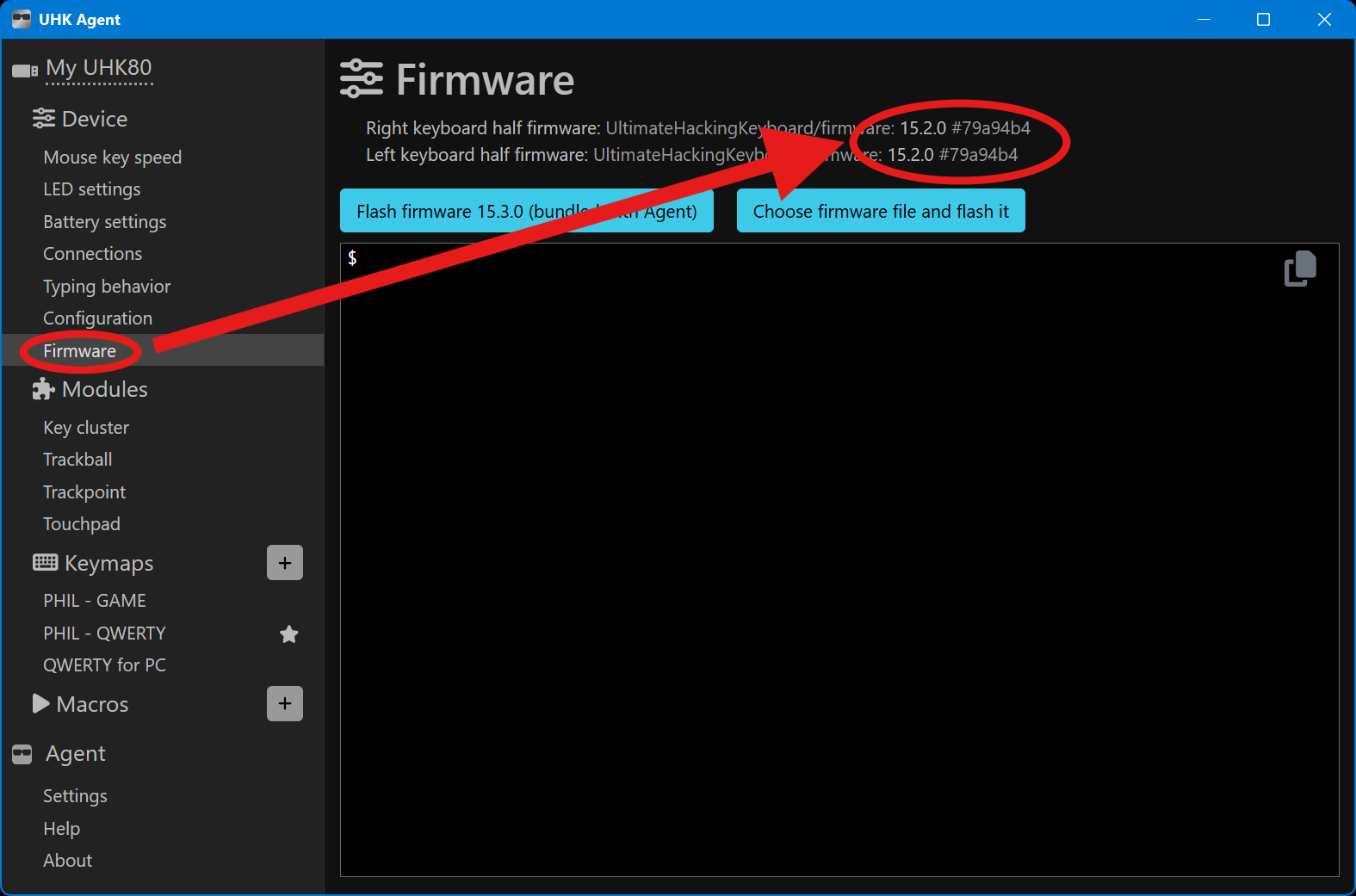
There is a firmware section in Agent that will display the firmware version.
Firmware is the software that runs on the keyboard. Agent is the software that runs on your computer. Each version of Agent comes bundled with a certain firmware version, but with Agent you can also install different firmware versions onto your keyboard. In order to help you better, @kareltucek needs to know which firmware was installed onto your keyboard.
I don’t know if this is the same issue, but I’ve been encountering situations where the keyboard will seemingly turn off (no LEDs, nothing on display, no keystrokes passed to the computer, can’t be awoken by S+F/J+L). But it still seems to be processing key-based macros, I have a shortcut bound to reboot that I can use to get out of this stuck state.
It’s been an issue for a few firmware versions, at least through 15.3.0, and seemingly only when connected to my Windows computer, not my Linux one.
A number of problems have been solved in the newer firmware. Hopefully the problem you were seeing has also been fixed.
You can download the uhk-firmware-15.3.1.tar.gz and then use Agent to install it on the UHK. On the Firmware page of Agent, use the button “Choose firmware file and flash it”, select the downloaded file, and then wait for a few minutes for Agent to install this firmware on the UHK.
Unfortunately, I can’t run Agent on that machine (work computer), and it’s random in when it happens. I sometimes have it happen many times in a day, and other times several days at a time with no issues (as has been the case since you asked this).
I’m not sure whether switching the USB connection over to the Linux computer with Agent (as part of answering your question) will wake it up, but I’ll give an update the next time I have the problem.
Started getting unlucky, I’ve just had four of these within a couple hours. Looking more closely as it turns off, it seems as though the keyboard thinks that it isn’t connected via USB (which is why it’s dark and not responding, but macros still run). I see “Disconnected” on the screen as it goes dark.
I can’t check whether it’s seen in Agent while in this state, as changing the USB connection to the other computer causes it to turn back on. This only occurs with my Windows laptop, I’ve never seen it happen while connected in the same way to my Linux desktop.
I have/had the same problem with my UHK80 on Linux, Firmware version 15.0.1. I get the same error messages (“event loop is spinning…”). So far it happened twice - The first time I just put it aside for a while and when I tried again it worked. The second time (today) I found this thread and used the reset-option. I upgraded the firmware to 15.3.1. Hopefully this fixed it.