I am looking for feedback on a new firmware feature I have been building in a UHK firmware fork in the past weeks.
With this feature, the macro language offers a new macroArg command. These commands can be used at the beginning of a macro to declare the arguments that the macro expects.
macroArg argument_name [ : type ] descriptive label
Examples:
macroArg mycounter:int "Number of cycles"
macroArg mystring:string 'Text to be repeated'
macroArg something:any "An arbitrary expression"
macroArg anotherthing :any "Another value"     // There can be a space before the colon
macroArg onemorething: any "One more value"    // There can be a space between the colon and the type
macroArg anadditionalthing : any "An additional value"    // There can be spaces before and after the colon
macroArg anything "Anything goes here"        // Types are optional and will default to :any
// this is how the parameters are accessed by name.
// in addition, they can also still be accessed as $macroArg.1, $macroArg.2 etc.
setVar counter $macroArg.mycounter   // identical to $macroArg.1
loop: write $macroArg.mystring       // identical to $macroArg.2
repeatFor counter loop
In Agent
In the final implementation of this feature, Agent is supposed to parse the macroArg statements and use the information to display argument lists and descriptive labels when mapping a key to this macro. This implementation in Agent is not available yet, but it’s the end goal.
If a macro has no macroArg statements, behaviour remains unchanged: Agent allows the user to add macro arguments and they will be labelled and can be accessed in the macro as $macroArg.1, $macroArg.2 etc.
More about the Agent-side implementation in this GitHub issue: Agent: descriptive labels and types for $macroArgs.
In firmware
macroArg statements can be used to declare names and types of $macroArg values. Arguments can be accessed as $macroArg.name (in addition to $macroArg.index). Depending on the type, processing will be handled a bit differently. The type is optional. If type is not given, it falls back to any and is handled like in previous versions (backwards compatible).
Grammar:
COMMAND = macroArg <argument name (IDENTIFIER)> [: MACROARG_TYPE] <argument description (STRING)>
MACROARG_TYPE = { int | float | bool | string | keyid | scancode | any }
Valid types are: int, float, bool, string, keyid | keyId, scancode | scanCode | moddedScancode | moddedScanCode | shortcut | shortCut, and any. Types are optional, a missing type is equivalent to any.
- For
int, the value needs to match the regex/^-?[0-9]+$/ - For
float, the value needs to match the regex/^-?[0-9]+(\.[0-9]*)?$/ - For
bool, the value can betrueorfalse. - For
string, the value can be anything and will be used verbatim (as-is, no $ expansions) - For
keyid, the value can be any KEYID (numeric or text, e.g. semicolonAndColon) - For
scancode, the value field can be any SHORTCUT (modded scancode, e.g. LS-a). - For
any, the value can be anything, and it will be processed as entered. This is identical to the old way of$macroArg.1,$macroArg.2etc. manually added parameters.
The descriptive label is a string literal; it can be enclosed in single or double quotes, or it can be a raw string. It is irrelevant for the firmware, but Agent will use it to display the descriptive label for each argument.
More about the firmware-side implementation in this GitHub issue: Firmware: descriptive labels and types for $macroArgs
Why is this useful?
Apart from descriptive labels in Agent, there are two major improvements in the firmware:
- macro arguments can be accessed by name
– makes macros more readable
– allows changing the order of arguments without changes to macro code - better type checking of arguments
– the typed values for keyid and scancode allow using such macro arguments without¯oArgnotation. You can simply writeifShortcut $macroArg.the_other_key ...ortapKey $macroArg.thiskeyand it will work as expected.
Here is an example:
macroArg thisKey:scancode 'This key sends'
macroArg otherKey:keyid 'Other key for chord'
macroArg chordKey:scancode 'Chord sends'
ifShortcut timeoutIn 100 $macroArg.otherKey final holdKey $macroArg.chordKey
holdKey $macroArg.thisKey
and in current Agent, you configure this as:
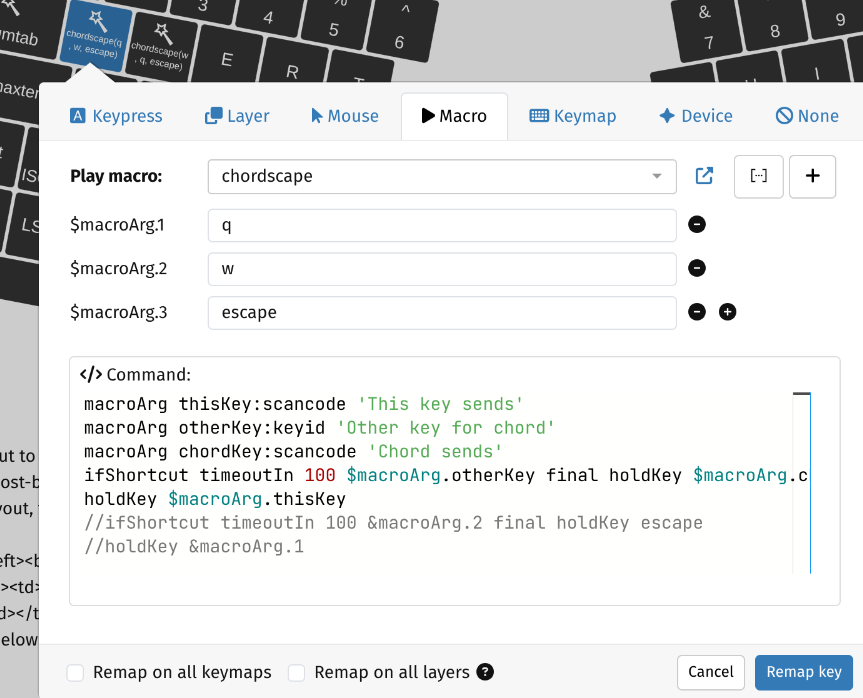
A future Agent would show the descriptive labels (‘This key sends’ etc.) instead of $macroArg.1 etc.
How to try out
Install firmware from here: CI · mhantsch/firmware@25083b5 · GitHub
This is based on current 16.2.0 master.
It should run all your current macros without changes. In addition, you can now try the macroArg command.
Feedback welcome!