Miryoku And homerow mods

Oh, and just as another explanation for the different modes of my hrm macros:

If you switch to hrm-off, you don’t get any hrms.
If you switch to hrm-on, you get Level 3 - hrms with same-hand avoidance.
If you switch to hrm-auto, you get Level 4 - hrms with same-hand avoidance and fast typing streak block-out.

1 Like

This parameter allows to set key positions that will trigger hold-tap resolution only for the positions in the provided list. If hold-tap is interrupted by a key that is not in the list, it immediately is interpreted as a tap.

This is the relevant excerpt from my ZMK config:

#define LEFT_HAND_KEYS   \
     0  1  2  3  4  5    \
    12 13 14 15 16 17    \
    24 25 26 27 28 29

#define RIGHT_HAND_KEYS  \
                          6  7  8  9 10 11 \
                         18 19 20 21 22 23 \
                         30 31 32 33 34 35

#define LEFT_THUMB_KEYS  \
             36 37 38 

#define RIGHT_THUMB_KEYS \
                         39 40 41

           lsht: left_shift_tap {
                compatible = "zmk,behavior-hold-tap";
                flavor = "balanced";
>               hold-trigger-key-positions = <RIGHT_HAND_KEYS RIGHT_THUMB_KEYS>;
                hold-trigger-on-release; // for combining HRMs
                tapping-term-ms = <U_TAPPING_TERM>;
                quick-tap-ms = <U_QUICK_TAP>;
                #binding-cells = <2>;
                bindings = <&kp>, <&kp>;
            };
            rsht: right_shift_tap {
                compatible = "zmk,behavior-hold-tap";
                flavor = "balanced";
>               hold-trigger-key-positions = <LEFT_HAND_KEYS LEFT_THUMB_KEYS>;
                hold-trigger-on-release; // for combining HRMs
                tapping-term-ms = <U_TAPPING_TERM>;
                quick-tap-ms = <U_QUICK_TAP>;
                #binding-cells = <2>;
                bindings = <&kp>, <&kp>;
            };

So, when I hold a key with a bound right_shift_tap behavior (e.g. K in Qwerty) and immediately tap any key on the left half, it is immediately interpreted as Shift+Left-Side-Key. But, when I hold the right_shift_tap behavior key, and either tap or hold (interrupt) any key on the same right side, it is immediately interpreted as a tap, no delay. So, I can roll the keys on the same side without being afraid of triggering any combination, and no delay, as if the were no Hold-Tap keys.

hold-trigger-on-release helps combining mods on the same side, that is, delays the resolution of Hold-Tap keys held on the same side and with set hold-trigger-key-positions, till the end of the initial (of the one held first) Hold-Tap resolution.

I did not follow this thread, but from the look of it, it may be very similar to what your macro does, except that in ZMK it’s a core Hold-Tap feature, and in QMK, it is provided as a third-party lib that is integrated with hooks.

PS: In my ZMK config, I have separated Shift behaviors from other mods behaviors. Other mod behaviors are even more restricted:

            rmt: right_mod_tap {
                compatible = "zmk,behavior-hold-tap";
                flavor = "balanced";
                hold-trigger-key-positions = <LEFT_HAND_KEYS LEFT_THUMB_KEYS>;
                hold-trigger-on-release; // for combining HRMs
                tapping-term-ms = <U_TAPPING_TERM>;
                quick-tap-ms = <U_QUICK_TAP>;
>                require-prior-idle-ms = <U_STREAK_DECAY>;
                #binding-cells = <2>;
                bindings = <&kp>, <&kp>;
            };

That is, U_STREAK_DECAY ms is required to pass after the last key press before any Hold-Tap resolution is even considered, so it’s a tap before they elapse.

2 Likes

Great explanation how all this is connected with UHK at the current state of its firmware. Also well done with the macro! Totally agree on the proposed improvements to the firmware.

I think urob meant that all the mentioned improvement up to Level 4 are part of “timeless” HRM. The way he explains things makes me think that all these improvements help one avoid relying on “mind” timers, the ones that one has to run in their head not to mess typing. In other words, you just type naturally and do not think about distracting delays and the such. Also you sort of get rid of many delays, introduced by the resolution process.

2 Likes

@proostas Awesome, thanks for the explanation. Yes, this is pretty much what I did with the same-hand avoidance (it’s just defined the other way round, listing the “other hand” keys).

And require-prior-idle-ms is of course the equivalent to the typing streak block-out that I implemented with the timer macro.

I completely agree. With the right features (macros), I just keep typing and it “just works”. No need to force myself to introduce typing delays.

1 Like

Ah, now I get your use of require-prior-idle-ms. You are blocking out mods during the typing streak except Shift. That one you keep enabled to allow easier typing of CamelCaseCapsWords etc. That makes a lot of sense.

1 Like

You mentioned somewhere else that you were inspired by the Kanata HRM options. Your Kanata setup includes basically the same concept you made available through the UHK macros?

Yes, it uses the same features (same-hand avoidance, auto-deactivation during typing streaks). The only difference is that the current Kanata config only triggers the streak auto-deactivation on the primary hrm keys, not all alpha keys. On the UHK, I’ve put macros on all alpha keys.

I intend to update that in Kanata, too, but haven’t found the time for it yet. (It’s less pressing for me now that HRMs work so well on the UHK…)

1 Like

That difference between Kanata config and UHK config was annoying me, so I just fixed it. The Kanata config now also auto-deactivates hr-mods on all alpha keys (while fast typing). Updated config is in my github.

2 Likes

Big thank you to @maexxx. Due to his implementation of cross-hand detection, I finally got home-row mods to work. I can recommend this for everyone using colemak layout, rolling home-row keys was a nightmare of missfires.
Next I will try typing streak detection.

1 Like

@stefan_schmerda Thanks for the feedback. Glad it works for you!

BTW, I now also have a keyboard using ZMK (I built myself an ErgoTravel with nice!nanos), and I am using pretty similar settings for this. Works very well!

(Details see here: ergotravel-zmk-module/boards/shields/ergotravel/ergotravel.keymap at main · mhantsch/ergotravel-zmk-module · GitHub)

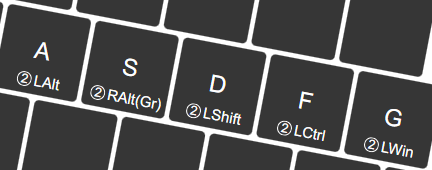
Re-visiting this older thread, I just realised that - thanks to homerow mods! - I now have AltGr on both sides of the keyboard, and in the same position on all my keyboards :wink:

1 Like

That is true! I was of course talking about the dreaded standard location of AltGr and the really dumb assignment of many AltGr characters in standard layouts. Everyone using the German layout knows what I am talking about. :wink:

Still I favor one-shot layers for characters. So I would put AltGr on a dedicated key, if I were to use such a layout.

But home row mods (or in the bottom row like I prefer, or top row like a few use them) are almost a must have for smaller keyboards. For the UHK60 or 80 they are of course still a cool option and highly recommended. Then you can use the modifier key locations on your UHK for macros or other stuff one benefits from with one-key access.

Since firmware 16.1.0, a native implementation of home row mods is now available. No complicated macros needed anymore.

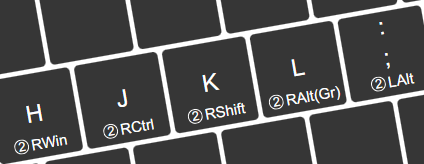
Step 1: Configure your secondary modifiers on your keymap, e.g.

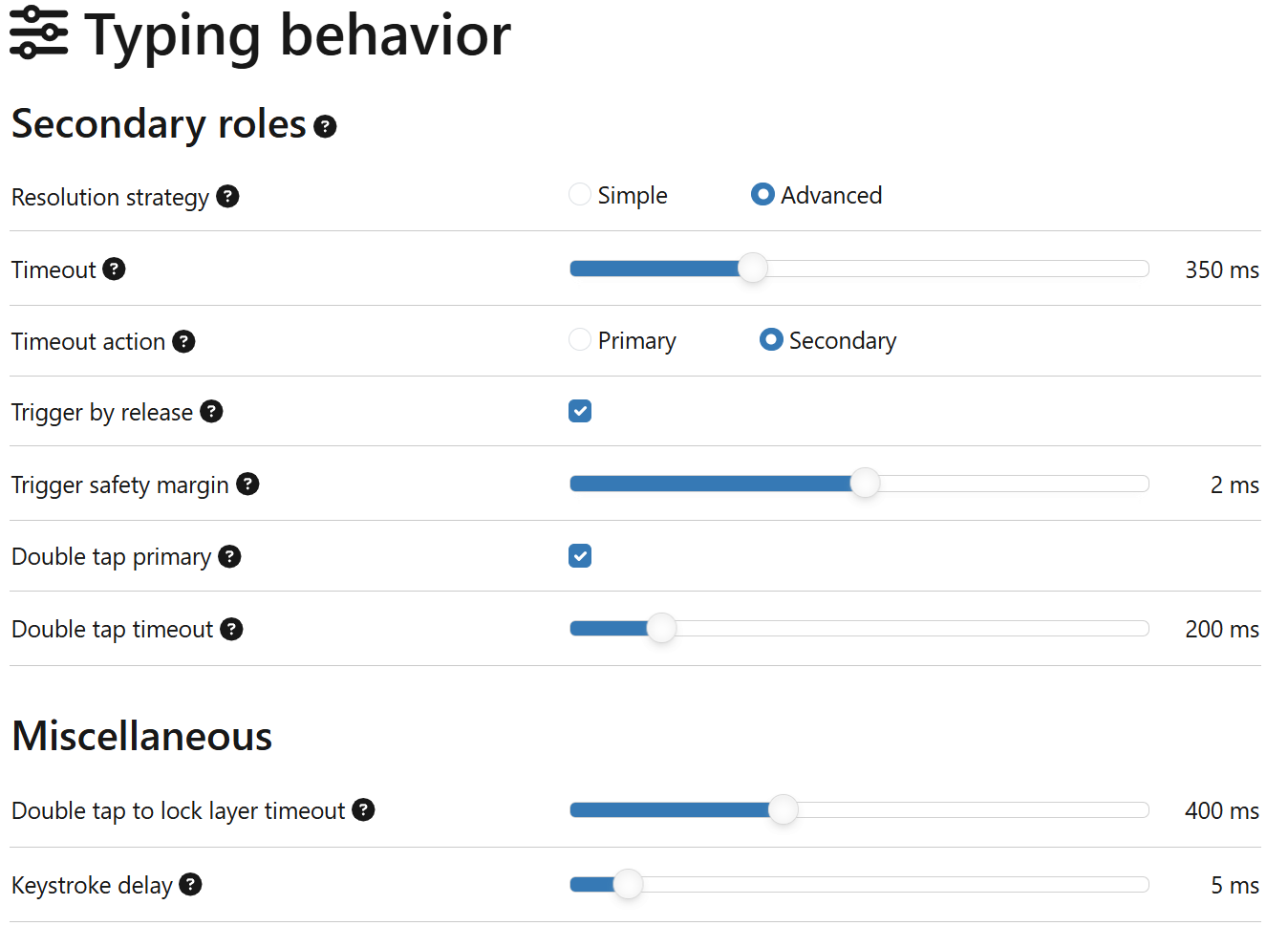
Step 2: Configure your Typing behaviour:

Step 3: Add some additional initialisation in your $onInit macro:

set secondaryRole.advanced.acceptTriggersFromSameHalf false
set secondaryRole.advanced.minimumHoldTime 50

Done!

This implements Level 1-3 of what has been described earlier in this thread, and does somewhat work towards Level 4 – usually good enough for daily usage.

Note: as of today (January 2026), a small bug remains: Shift modifier sometimes missing when layer is activated via secondary action in macro · Issue #1445 · UltimateHackingKeyboard/firmware · GitHub but that will only affect very odd use cases.

P.S. See also the originating thread: HRM/Secondary Role - Yet another way. With examples!

1 Like

what is the reasoning for the minimum hold time please?

I had a few (very few) misfires, and tried to reduce them. Not that it made much difference. You can leave it at 0 or unset, if you please.

To be more detailed: The new HRM handling doesn’t implement “Level 4 - typing streaks detection”. I found that with fast typing lock-out in my original macros as well as my Kanata setup and my ZMK configuration, I had more consistent success with HRM. I type around 80-100 wpm in typing tests, so, yes, I am sensitive to timings.

The new HRM handling isn’t bad at all (I use it as a daily driver now), but I got slightly more misfires than with the other setups. So one attempt was to add those 50ms as minimum hold time.

1 Like

Minimum hold time is the least amount of time a key must be held before it’s allowed to trigger secondary. It’s a tool to reduce false triggers.

Thanks so much for the tutorial @maexxx .

I updated my firmware today, and I’m really impressed because of the new capabilities on the UHK. I’m really grateful @Firngrod for your awesome work.

5 Likes