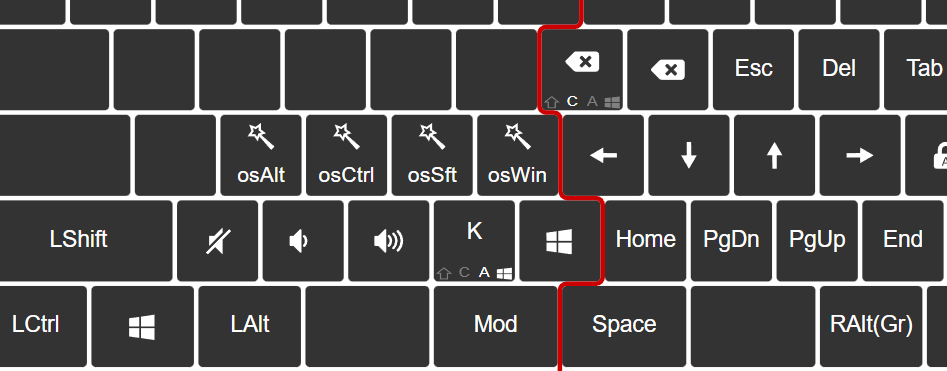
I have used this with QMK before…
Having Alt/Ctrl/Shift in a layer as oneshot. Then I can fire shortcuts without reaching to the modifiers far away.
With UHK this works for a single modifier. I create 3 macros like
oneShot holdKey leftAlt -> on Fn S
oneShot holdKey leftControl -> on Fn D
oneShot holdKey leftShift -> on Fn F
So Fn-D, F for Ctrl-f works fine, but triggering 2 macro Fn-D+F, F for Ctrl-Shift-f does not work.
How would I do this?
If it doesn’t work then probably not atm.
But I guess we can implement it  .
.
2 Likes
I am eagerly waiting for it, each time I am doing c-s-R (rename), c-a-H (call history), …
Please, do it soon
1 Like
Do you think it will be done soon? when? 
1 Like
I have it written down on my personal todo list, but despite that, it probably won’t be done soon. I am quite overwhelmed these days, and trying to reduce the clutter of my mental space to absolute minimum.
Sorry about it :-(.
1 Like
Just to update you: I have written a new implementation “mockup” over the holidays - it is far from finished (basically just written down an idea and thought hard over it for a couple of hours, not ran it a single time yet), and I don’t know when I can get to that, but it is moving.
2 Likes
Here is a pilot implementation (the firmware artifact is visible after login): Rehaul oneshots. Allow accumulation. · UltimateHackingKeyboard/firmware@acc9f07 · GitHub
Would you give it a test @frankbenoit ?
2 Likes
I am running it now.
The combination are fine and the direct usage of holding as well.
Now, e.g. in Eclipse I can mod-osAlt&osSft, then ‘r’ for rename.
Or in mod, hold osCtrl and use the arrow left/right to jump wordwise, or in combination with osSft to select wordwise.
Seems fine to me. I will come back if I encounter problems in the next days.
Thanks for taking my request!
2 Likes