I am the proud owner of a UHK for a couple of years now and I am very happy with it! There’s just something I’m missing, which I wanted to share.
In Agent, there are currently two modes in the LED settings: Functional backlighting and Per-key backlighting. This is a bit too much “all or nothing” for my use case. I have several scenarios now where I would have wanted to keep the Functional backlighting, but just with a few exceptions or tweaks.
Use case 1: I use the Programmer Dvorak layout, which became a possibility after the added feature to map custom keys in the Shift layer (thank you!). However, in the functional backlighting mode, a couple of keys in the top row now have the Shortcut color code. It just doesn’t look nice. I would want to “fix” that, but I can’t without having to redo the entire functional backlighting map manually.
Use case 2: For the majority of the time, I touch type so I am considering switching to blank key caps (especially since I don’t use the QWERTY layout by default). However, as a Front-end developer and UI designer, I also use design software occassionaly. For that, I switch to using my mouse in my right hand and pressing keys with my left hand to switch tools. I need to look at the keyboard for that. It would really help me out here if I could just color code a couple of keys in one layer that I specifically set up for this, so I would be able to find them easily with blank key caps as well.
TL;DR: I miss the option of adding some exceptions to the functional backlighting mode, without having to redo al the coloring in all the layers and keymaps.
Thanks. I’ve been looking into this, but I can’t find what you are referring to. There’s nothing about it in the macro guide (I only see mentions of brightness and enable/disable LEDs entirely, but I can’t find how to change colors). Can you point me in the right direction?
Anyway, my request for an easier solution built in Agent still stands
I tentatively support the request, but given the number of serious problems we are facing these days this is not the best time. I.e., definitely give us head ups in like half a year?
Haha, my apologies! That’s no problem, just wanted to share my experience and use cases with the keyboard in case it helps anybody
I went and took the time to re-color all my keymaps and layers based off of the functional backlighting with the extras I wanted. So for now, I’m good!
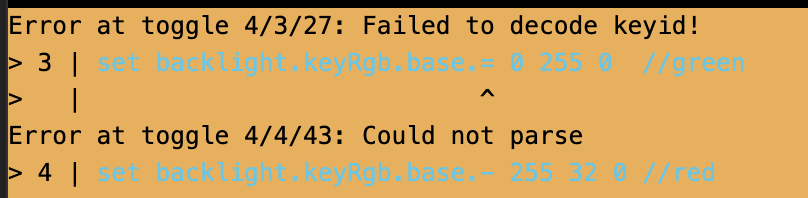
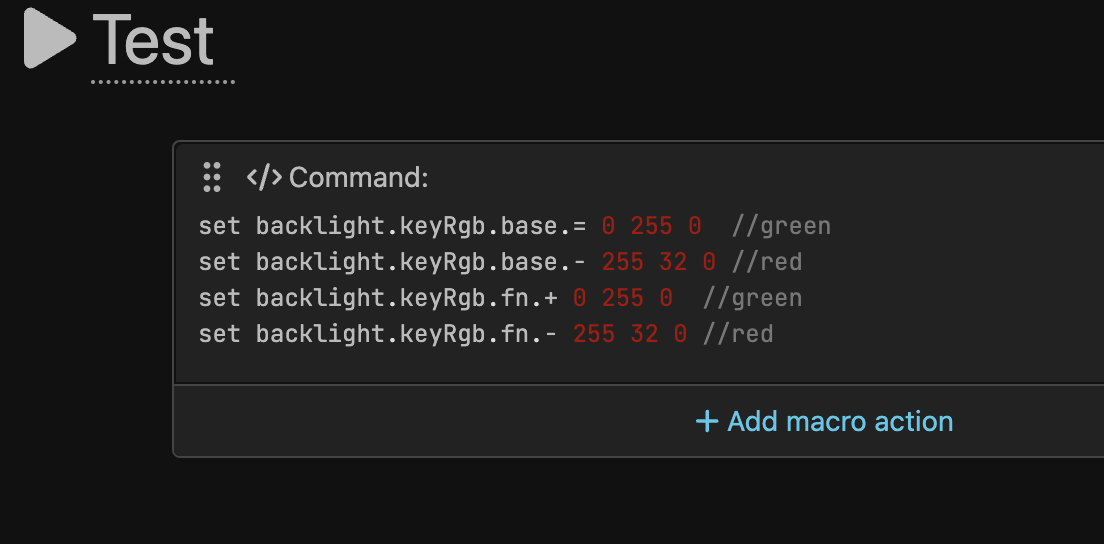
Sorry it looks like this:
set backlight.keyRgb.base.= 0 255 0 //green
set backlight.keyRgb.base.- 255 32 0 //red
set backlight.keyRgb.fn.+ 0 255 0 //green
set backlight.keyRgb.fn.- 255 32 0 //red
Yep the KEYID_ABBREVs worked. Some folks are updating the LED to indicate the status of things. I prefer the main LED to indicate the key mapping since I have to move between Windows and a Mac. I also think it’s more fun to use the key led colors.