I have mapped the upper left key to be ESCAPE. I want to map that same key to give a tilde when I press the alt and then the key. Not alt shift. ALT. The problem is that the dropdown list contains some punctuation “pairs” and wont let me just type a tilde, it only will allow a tic - tilde pair and it wont let me change the order. The picture below is the alt layer but i have tried on other layers as well. I just want ESCAPE on the key with no modifiers and Alt-key to be tilde. Save my UHK from my shotgun please.
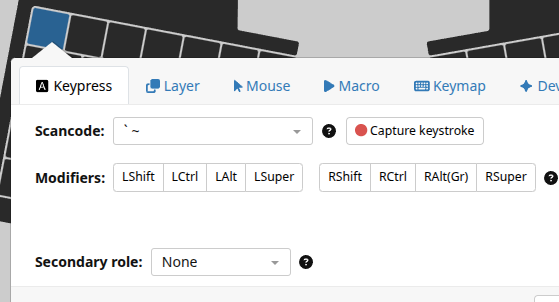
Is there even a ‘~-key’ in the usb keyboard specs? I think the way to get what you want is to map the Backtick-Tilde key with the shift modifier on your Alt layer. So when you press Alt-Esc, the keyboard sends Shift-`, giving you a tilde. This requires of course that it will release the Alt for that event. I don’t know if it works like that, but it’s worth a shot.
1 Like
On the Alt layer, just configure the Scancode `~ with Modifiers LShift.
On the Base layer, you configure it as Escape.
How do you plan to type backtick (`)?
1 Like
I am on a Mac and using a GB setup, I have the below on my Base layer the below will do what you want
ifAlt final suppressMods tapKey LS-\
ifNotAlt tapKey escape
1 Like
In Windows, it doesn’t seem to matter how you approach it. If you use a modifier, it will take a few taps to register the desired key because the modifier is still sent to host first. E.g., Tapping Alt in Notepad will trigger an overlay showing Alt-underline shortcuts.
one problem at a time.
Thank you! Understanding this will also help me going forward.