Solid build; it feels really polished, the palm rests feel great, the chassis feels solid with no bending.
Palm rests are big enough for my hands to rest on.
Size is surprising. From the pictures, it looks substantially bigger, but it’s only the palm rests and the top edge that are additional; no issues with that.
That battery adds some heft!
Enter key is just long enough to hit without issue. Because it goes away from your pinky, it’s easy enough to tell which key it is.
Surprisingly easy to adjust to having the board split and angled. I have been using a charachorder in the past, so that definitely prepared me for the split action.
No lighting bleed; if you set keys to separate colours, they don’t all bleed together.
Software (to remap at least) is easy enough to follow and load.
Some oddities:
Remapped my layout as Ive been using a custom layout for 2+ years now and all the key have different angles and depths?? Please see below for an image. This is not ideal. I will see how I go, but this feels really weird having different shaped keys on different rows, I didn’t even think to ask about this. Can you get neutral caps for the UHK, so they are all the same height and angle?
The webpage is not clear enough on needing to purchase a dongle to use it wirelessly. There’s one line 7/8ths of the way down the page: “The UHK Dongle can be separately purchased if you want wireless USB connectivity.” This needs to be highlighted more readily. Will I use it wirelesly? Possibly, possibly not, but the fact you need to buy an additional item is not clear enough IMO.
Time to go look into the software some more to see what I can do!
The UHKs use OEM profile keycaps. If you want caps that can be used on any row without a height/angle difference, you’ll have to use a flat/uniform profile. That’s something you’d need to get from a third party, as UHK only sells the OEM profile.
Here’s a tool you can use to see a side profile of some of the common keycap profiles.
Finding compatible caps is quite a challenge, but luckily there’s a couple of custom keycap services that provide such profiles. Yuzu and FK Custom are quite good quality, and I’ve made a few sets from them. They have some UHK templates to make things easy, or you can custom design the legends to be whatever you want if you’d like. You can also make a bunch of extras with your order, if you can’t make up your mind .
There’s also Thockfactory, but I haven’t tried them yet. Iirc, they don’t offer a uniform profile, but they are customizable. So if you know for sure what you want on your legends, and you don’t plan to move them around, that’s another option.
Yuzu keycaps are opaque, so the legends won’t be illuminated. The FK Customs are available in a shine-through variant. If you think that’s something you’d be interested in, I’d check out their Discord channels, as they are very friendly, and someone will answer your questions pretty quickly. You can also ask here, of course.
I prefer flat profiles myself, and here’s some I’ve ordered from Yuzu, and FK:
My FK Custom caps (XDA profile):
My most recent Yuzu caps (KAM profile):
Here’s a blog post from @maexxx showing off just how intricate and complex the Yuzu customization can be:
Anyway, my suggestion is to take your time, and experiment with your layout before making any decisions.
As for the wireless connectivity-
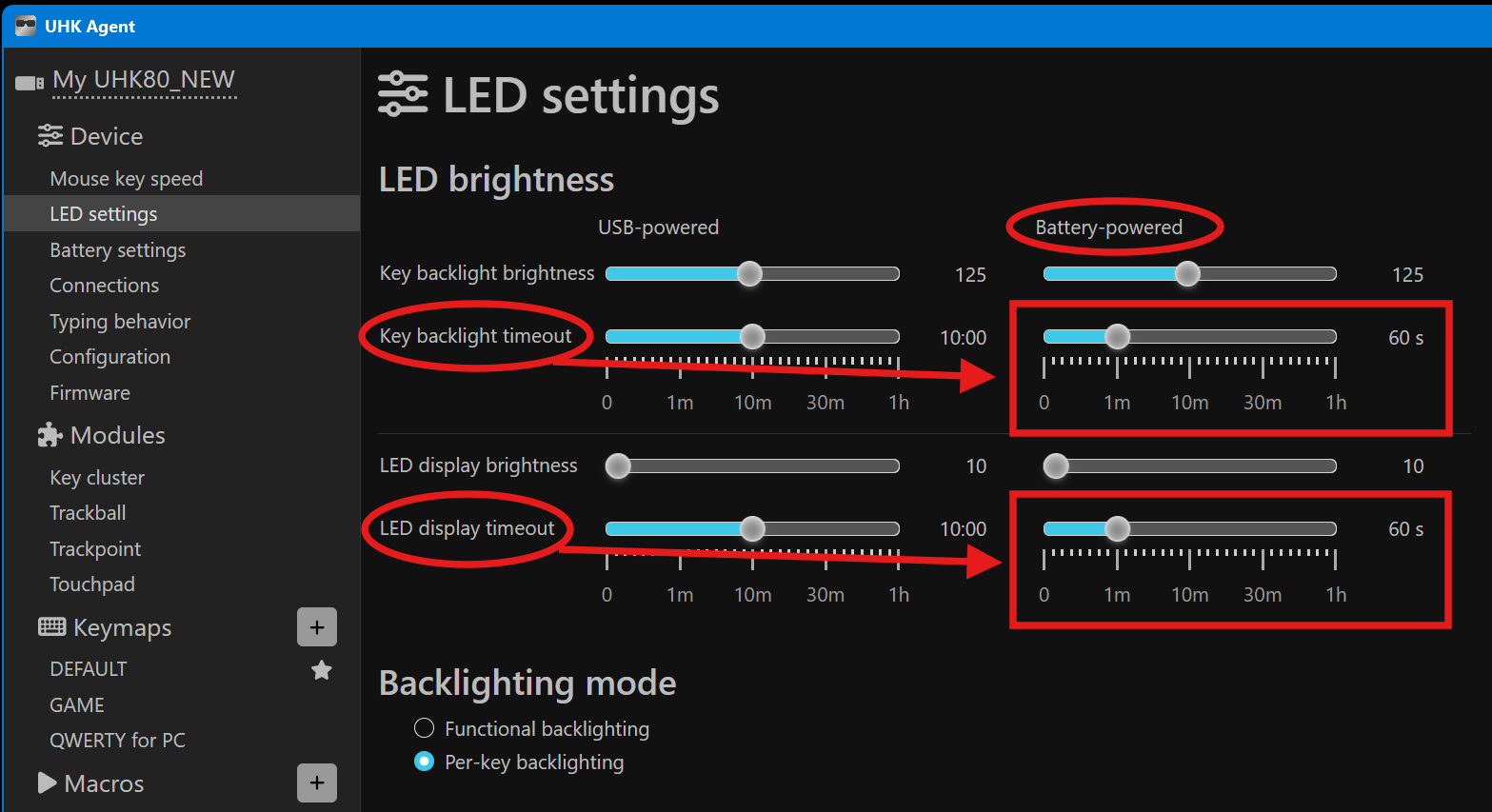
Have you tried connecting to anything via Bluetooth? (no dongle needed for BT) Dongle is definitely more stable, but like I mentioned earlier, BT should currently work fine if you’re only using one BLE device.
The mouse movement is really, really nice. I have used a few different scripts to replicate the mouse movement, and it is similar to the one I have been using for a while.
I am trying to work out the speed settings for the mouse to make it feel more natural. What settings do people use?
Liking the fact that you can set per key lighting options, however the colour can’t be too dark or you can’t see the keys well and if you have different colours next to each other, you need to ensure they are different enough to be distinguishable.
Alright! I have connected with Bluetooth and no issue! Thank you for pointing this out, I can hold off using a dongle for now. Even better, I can connect the USB and charge whilst connected via Bluetooth, win win!
RE keys, those Yuzu caps look pretty amazing! The caps in that second link are trippy as! I will need to check out the caps to see what will suit me.
Day 2 of using the board: Trying to find the sweet spot to put the two halves; because the keys are narrower than my Keychron, when the board is connected, it feels “squeezed in”. Trying to work out how far apart I need to keep them so that it feels “natural”.
Question: I am wondering what the design thinking was around putting space on the right thumb in it’s “normal” position vs the left hand, which is in the recessed row below. Is it purely to allow people to experiment with the two different heights to see what feels more “normal” for them, or was there a design reasoning for this?
Also, because I am running them split, it stops my hands from “crossing the midline”; my left hand types keys only on the left and vice versa. Will be interesting to see how my hands adjust to this.
So I think in my case, KAM profile is what I would want. I will just work out what I want on the other layers before going with any custom caps, but it will be sooner rather than later as typing on different heights is weird.
Do you mean that all the keys feel closer together, or just the right side’s (RShift/RCtrl, arrow/navigation) keys? If it’s the former, it’s because the Keychron uses low profile LSA caps, which have a wider top surface than the UHK’s OEM profile (smaller gaps between keys). Otherwise, the majority of the main keys (alphas, etc.) should be about the same keyswitch spacing for both the UHK and Keychron. So that may be another point to consider when choosing new keycaps.
FK Custom has an LPF profile keycap option that are somewhat similar to the Keychron’s LSA caps. If I’m not mistaken, the LSAs are uniform, but not flat on top; they have an angle, but every cap’s row height/angle is the same. The FK LPFs don’t have the angle, but are uniform/flat. (Most caps have a scoop on the top surface, but shouldn’t be confused with an angle.)
Another thing to keep in mind is that the UHK uses a standard height MX-style keyswitch compared to the Keychron’s low-profile switches. This means that due to the overall shorter keycap height, using a low-profile cap on the UHK will reveal more of the underglow from the RGB lighting, so there may be a bit more light-bleed.
Careful, mechanical caps/switches is a rather expensive rabbit-hole…
Yep, that’s what it is! I haven’t used OEM profile in a long time (Amiga 500 days), so it’s weird to get used to again. Will need to switch back, but I don’t want to lose the see through ability, as the RGB actually plays a part in the use of the UHK.
Thanks for this, I’ll have to be careful with keycap selection it seems!!
Here’s hoping. I’ve typed on a connected board for so long, that I’ve gotten used to the weird way you had to twist your wrists to press some letters. Now I just have to get used to my fingers stretching instead (like they are supposed to), but the keycap height will also help.
The ability to add key by key lighting options makes it very easy to a) identify which layer is active, b) which keys do what in each layer and c) segregate the keys without having to separate them physically.
I found that either the USB cord or the USB-C to USB-A dongle has some connectivity issue with my Surface at the least. When using the USB-A port, the board has started to disconnect and then reconnect over and over. When connected via Bluetooth, I had no connectivity drop outs. I have since switched to a different cable and it is stable again.
When in Linux Mint and connected via Bluetooth, the RGBs would light up, then turn off, then light up, then turn off, etc if I wasn’t actively interacting with the keys. Is this normal?
I really like the fact that you can toggle the “double click to lock this layer” - super useful for the mouse layer at a minimum, will be great to see how else I can use this feature with other layers.
I was able to combine this script and one other to allow me to quickly place the mouse cursor into a) the corners of the screen, or b) the middle of any edge or c) the centre of the screen using single key presses. This significantly reduces the amount of mouse movement I need to do.
I am hoping that using these scripts, combined with increased use of native, application specific keyboard shortcuts will mean that I will reduce my reliance / need for a stand alone mouse, which means my hands stay “in one place” for a vast majority of my PC use,
No modules here. Will give it another test and report the findings.
So I have been able to pull together an AHK script that allows me to go to the corners, centres of the screen edges and also the centre of the screen for quick mouse navigation. With this, my need to move my mouse is significantly reduced. This is making my use of the UHK very enjoyable already.
This is great for my Windows device at home (down to one), and possibly for work if it ends up being my main board at work. Unfortunately, for my Linux machine (my main one at home where I am using the UHK) cannot run AHK natively. I need to look at how / if I can do this via VirtualBox or similar.
I have been able to install VirtualBox and AutoHotkey onto my Linux machine. Unfortunately, the script only operates when the VirtualBox is the active program. I was assuming this was going to be the case, but I had to test to quench my curiosity.
Scripts are as per below. Does anyone know of a way to replicate this behaviour within the Agent or just Linux in general (the image is the icon I use to change the icon in the taskbar for the script)?
;START OF CONFIG SECTION

#SingleInstance force
#MaxHotkeysPerInterval 500
#MaxThreadsPerHotkey 2

UHKIcon := "C:\Autohotkey\!Testing\UHKIcon.png"

;Set the icon image
Menu,Tray,Icon, %UHKIcon%

#Include %A_ScriptDir%\move_mouse_and_windows.ahk

;This is needed or key presses would faulty send their natural
;actions. Like NumPadDiv would send sometimes "/" to the
;screen.
;#InstallKeybdHook

ToggleState := 1

;add in a toggle.
Pause::

    Suspend
    Pause,, 1

    If A_IsSuspended
    {
        ToolTip % "===> SUSPENDED <==="

        Sleep 2000
        ToolTip

    }
    Else
    {

        ToolTip % "===> ACTIVE <==="
        ;SoundBeep 1500

        Sleep 2000
        ToolTip

    }

Return


RemoveToolTip:
SetTimer, RemoveToolTip, Off
ToolTip
Return

;-------------------------------------------------------------------------

j::MoveMouseActiveMonitor("topleft")
8::MoveMouseActiveMonitor("top")
p::MoveMouseActiveMonitor("topright")
d::MoveMouseActiveMonitor("bottomleft")
.::MoveMouseActiveMonitor("bottomright")
m::MoveMouseActiveMonitor("bottom")
i::MoveMouseActiveMonitor("left")
`;::MoveMouseActiveMonitor("right")

;-------------------------------------------------------------
;MOUSE CENTRES
;-------------------------------------------------------------

;From move_mouse_and_windows.ahk

1::

    MoveMouseToSpecificMonitor(1, "center")

Return


2::
	MoveMouseToSpecificMonitor(2, "center")

Return


3::
	MoveMouseToSpecificMonitor(3, "center")

Return

4::
	MoveMouseToSpecificMonitor(4, "center")

Return
The move_mouse_and_windows.ahk script which is included inside the script above:
;~ #NoEnv  								    ;Recommended for performance and compatibility with future AutoHotkey releases.
;~ ;#Warn  								    ;Enable warnings to assist with detecting common errors.
;~ SendMode Input  						    ;Recommended for new scripts due to its superior speed and reliability.
;~ SetWorkingDir %A_ScriptDir%  		    ;Ensures a consistent starting directory.
;~ #Persistent							    ;Required for timers
;~ #SingleInstance Force 				    ;Ensure only a single instance is running
;~ SetTitleMatchMode, 2					    ;Enable search for partial string in window title
;~ Gui +LastFound +OwnDialogs +AlwaysOnTop	;Ensure any MsgBoxes are always on top

/*
Set of functions to move windows around monitors
Take system monitor numbers and create an array sort from left to right then down

monArray - sorted array of monitors on the system

monArray elements
System Monitor No := 1
TopLeftX := 2
TopLeftY := 3
BottomRightX := 4
BottomRightY := 5
monOrientation := 6 i.e. Landscape, Portrait, Square

18/03/2025 - added function MoveMouseActiveMonitor

*/

MoveWinToLeftorRightMonitor(direction)
{
/*
    Moves active window to either the left or right monitor.
    If it was windowed, will try to keep the same relative position on the new screen.

    Parameters:
    direction (str) : Left / Right

    Returns:
    null

    Raises:
    null
*/

    dev_mode := 0

    monArray := []
    MonitorNo := 1
    TopLeftX := 2
    TopLeftY := 3
    BottomRightX := 4
    BottomRightY := 5

    ;Exit if only 1 monitor on system
    SysGet, NoOfMonitors, MonitorCount

    if NoOfMonitors = 1
    {
        return
    }

    ;Get details of monitors
    GetArraySortedMonitors(monArray) ; returns array to monArray (ByRef)

    ;get details of the active window
	WinGet, active_id, ID, A
	WinGet, ActiveWinMaximised, MinMax,A
	WinGetTitle, ActiveWinTitle, A
	WinGetPos, ActiveWinX,ActiveWinY,ActiveWinWidth,ActiveWinXHeight,A

    ;Get some details of the window
    appMonArrayIndex := GetArrayMonIndexAppOn(monArray,active_id)
    adjacentMonitor := GetAdjacentMonitorNo(monArray, appMonArrayIndex, direction)
    ActiveWinXMid := floor(ActiveWinX + (ActiveWinWidth/2))	    ;X - center of App window
    ActiveWinYMid := floor(ActiveWinY + (ActiveWinXHeight/2))	;Y - center of App window

    currentMonWidth := monArray[appMonArrayIndex][BottomRightX] - monArray[appMonArrayIndex][TopLeftX]
    currentMonHeight := monArray[appMonArrayIndex][BottomRightY] - monArray[appMonArrayIndex][TopLeftY]
    newMonWidth := monArray[adjacentMonitor][BottomRightX] - monArray[adjacentMonitor][TopLeftX]
    newMonHeigh := monArray[adjacentMonitor][BottomRightY] - monArray[adjacentMonitor][TopLeftY]

    if (ActiveWinMaximised)
    {

        if ((currentMonWidth = newMonWidth) AND (currentMonHeight = newMonHeigh))
        ;new mon same dims - just move it
        {
            x := monArray[adjacentMonitor][TopLeftX]
            y := monArray[adjacentMonitor][TopLeftY]

            winmove, ahk_id %active_id%,, x, y
        }
        else ;new mon diff dims - move and resize to fit
        {
            x := monArray[adjacentMonitor][TopLeftX]
            y := monArray[adjacentMonitor][TopLeftY]

            winmove, ahk_id %active_id%,, x, y ,newMonWidth,newMonHeigh
        }

    }
    else ;was windowed, move to same realtive position to top lect of next screen
    {
        relX := ActiveWinX - monArray[appMonArrayIndex][TopLeftX]
        relY := ActiveWinY - monArray[appMonArrayIndex][TopLeftY]

        newWinRight := monArray[adjacentMonitor][TopLeftX] + relX + ActiveWinWidth
        newWinBottom := monArray[adjacentMonitor][TopLeftY] + relY + ActiveWinXHeight

        ;make sure win bottom right will not be off the screen
        if (newWinRight > monArray[adjacentMonitor][BottomRightX])
        {
            x := monArray[adjacentMonitor][TopLeftX] + (newWinRight - monArray[adjacentMonitor][BottomRightX])
        }
        else
        {
            x := monArray[adjacentMonitor][TopLeftX] + relX
        }

        ;make sure win bottom Y will not be off the screen
        if (newWinBottom > monArray[adjacentMonitor][BottomRightY])
        {
            y := monArray[adjacentMonitor][TopLeftY] + (newWinBottom - monArray[adjacentMonitor][BottomRightY])
        }
        else
        {
            y := monArray[adjacentMonitor][TopLeftY] + relY
        }

        winmove, ahk_id %active_id%,, x, y
    }

    if (dev_mode)
    {

        msg := "Sub - MoveWinToLeftorRightMonitor(direction) `n`n"

        msg .= active_id . "," . ActiveWinMaximised . "," . ActiveWinTitle . "," . ActiveWinX . chr(13)
        msg .= "Win Mid X = " . ActiveWinXMid . chr(13)
        msg .= "appArrayMonitorIndex: " . appMonArrayIndex . chr(13)
        msg .= "adjacentMonitor: " . adjacentMonitor . chr(13)
        msg .= "ActiveWinXMid: " . ActiveWinXMid . chr(13)
        msg .= "ActiveWinYMid: " . ActiveWinYMid . chr(13)
        msg .= "currentMonWidth: " . currentMonWidth . "`n"
        msg .= "currentMonHeight: " . currentMonHeight . "`n"
        msg .= "newMonWidth: " . newMonWidth . "`n"
        msg .= "newMonHeigh: " . newMonHeigh . "`n"
        MsgBox % msg
    }
}
;~ Return

MoveActiveWinToSpecificMonitor(arrayMonNo)
{
/*
    Moves active window to either the left or right monitor.
    If it was windowed, will try to keep the same relative position on the new screen.

    Parameters:
    direction (str) : Left / Right

    Returns:
    null

    Raises:
    null
*/

    dev_mode := 0

    monArray := []
    MonitorNo := 1
    TopLeftX := 2
    TopLeftY := 3
    BottomRightX := 4
    BottomRightY := 5

    ;Exit if only 1 monitor on system
    SysGet, NoOfMonitors, MonitorCount

    ;Basic Error checking, make sure num provided in range
    if ((arrayMonNo <1) or (arrayMonNo > NoOfMonitors))
    {
        msg := "Move Window to Specific Monitor`n`n"
        msg .= "Input " . arrayMonNo . " not within monitor range 1-" . NoOfMonitors

        ;19/07/2025 submeg- I want to keep going to see if I can just handle the error where it is called.

        ;MsgBox % msg
        ;return
    }
    ;only 1 monitor - nothing to do.
    else if (NoOfMonitors = 1)
    {
        return
    }

    ;Get details of monitors
    GetArraySortedMonitors(monArray) ; returns array to monArray (ByRef)

    ;get details of the active window
	WinGet, active_id, ID, A
	WinGet, ActiveWinMaximised, MinMax,A
	WinGetTitle, ActiveWinTitle, A
	WinGetPos, ActiveWinX,ActiveWinY,ActiveWinWidth,ActiveWinXHeight,A

    ;Get some details of the window
    appMonArrayIndex := GetArrayMonIndexAppOn(monArray,active_id)
    ;~ adjacentMonitor := GetAdjacentMonitorNo(monArray, appMonArrayIndex, direction)
    ActiveWinXMid := floor(ActiveWinX + (ActiveWinWidth/2))	    ;X - center of App window
    ActiveWinYMid := floor(ActiveWinY + (ActiveWinXHeight/2))	;Y - center of App window

    currentMonWidth := monArray[appMonArrayIndex][BottomRightX] - monArray[appMonArrayIndex][TopLeftX]
    currentMonHeight := monArray[appMonArrayIndex][BottomRightY] - monArray[appMonArrayIndex][TopLeftY]
    newMonWidth := monArray[arrayMonNo][BottomRightX] - monArray[arrayMonNo][TopLeftX]
    newMonHeigh := monArray[arrayMonNo][BottomRightY] - monArray[arrayMonNo][TopLeftY]

    if (ActiveWinMaximised)
    {

        if ((currentMonWidth = newMonWidth) AND (currentMonHeight = newMonHeigh))
        ;new mon same dims - just move it
        {
            x := monArray[arrayMonNo][TopLeftX]
            y := monArray[arrayMonNo][TopLeftY]

            winmove, ahk_id %active_id%,, x, y
        }
        else ;new mon diff dims - move and resize to fit
        {
            x := monArray[arrayMonNo][TopLeftX]
            y := monArray[arrayMonNo][TopLeftY]

            winmove, ahk_id %active_id%,, x, y ,newMonWidth,newMonHeigh
        }

    }
    else ;was windowed, move to same realtive position to top lect of next screen
    {
        relX := ActiveWinX - monArray[appMonArrayIndex][TopLeftX]
        relY := ActiveWinY - monArray[appMonArrayIndex][TopLeftY]

        newWinRight := monArray[arrayMonNo][TopLeftX] + relX + ActiveWinWidth
        newWinBottom := monArray[arrayMonNo][TopLeftY] + relY + ActiveWinXHeight

        ;make sure win bottom right will not be off the screen
        if (newWinRight > monArray[arrayMonNo][BottomRightX])
        {
            x := monArray[arrayMonNo][TopLeftX] + (newWinRight - monArray[arrayMonNo][BottomRightX])
        }
        else
        {
            x := monArray[arrayMonNo][TopLeftX] + relX
        }

        ;make sure win bottom Y will not be off the screen
        if (newWinBottom > monArray[arrayMonNo][BottomRightY])
        {
            y := monArray[arrayMonNo][TopLeftY] + (newWinBottom - monArray[arrayMonNo][BottomRightY])
        }
        else
        {
            y := monArray[arrayMonNo][TopLeftY] + relY
        }

        winmove, ahk_id %active_id%,, x, y
    }

    if (dev_mode)
    {

        msg := "Sub - MoveWinToLeftorRightMonitor(direction) `n`n"

        msg .= active_id . "," . ActiveWinMaximised . "," . ActiveWinTitle . "," . ActiveWinX . chr(13)
        msg .= "Win Mid X = " . ActiveWinXMid . chr(13)
        msg .= "appArrayMonitorIndex: " . appMonArrayIndex . chr(13)
        msg .= "arrayMonNo: " . arrayMonNo . chr(13)
        msg .= "ActiveWinXMid: " . ActiveWinXMid . chr(13)
        msg .= "ActiveWinYMid: " . ActiveWinYMid . chr(13)
        msg .= "currentMonWidth: " . currentMonWidth . "`n"
        msg .= "currentMonHeight: " . currentMonHeight . "`n"
        msg .= "newMonWidth: " . newMonWidth . "`n"
        msg .= "newMonHeigh: " . newMonHeigh . "`n"
        MsgBox % msg
    }
}
;~ Return

MoveMouseToSpecificMonitor(arrayMonNo, position)
{
/*
    Moves the mouse pointer to the specific monitor and places it at the required position
    Left Edge, Centre Right Edge, Top or Bottom of the screen.

    NOTE: For some reason on my system, windows does not report the correct size for the laptop monitor.
          As a result, the positioning of the center and right positions is off on that screen.

    Parameters:
    arrayMonNo (int): array index of required monitor
    position (str) : left / center / right / top / bottom - relative position on the screen

    Returns:
    null

    Raises:
    null
*/

    dev_mode := 0

    monArray := []
    MonitorNo := 1
    TopLeftX := 2
    TopLeftY := 3
    BottomRightX := 4
    BottomRightY := 5
    pixelBuffer := 10    ;move mouse in a bit from edge of screen

    ;Get the number of monitors on the system
    SysGet, NoOfMonitors, MonitorCount

    ;Basic Error checking, make sure num provided in range
    if ((arrayMonNo <1) or (arrayMonNo > NoOfMonitors))
    {
        msg := "Move Window to Specific Monitor`n`n"
        msg .= "Input " . arrayMonNo . " not within monitor range 1-" . NoOfMonitors
        MsgBox % msg
        return
    }

    ;Get details of monitors
    GetArraySortedMonitors(monArray) ; returns array to monArray (ByRef)

    CoordMode, mouse, Screen    ;default, but ensure it's the screen, not window

    ;get the x,y of mouse position on new monitor
    if (position = "left")
    {
        monMidY := floor(abs((monArray[arrayMonNo][BottomRightY] - monArray[arrayMonNo][TopLeftY]) / 2))
        newMX := (monArray[arrayMonNo][TopLeftX]) + pixelBuffer
        newMY := (monArray[arrayMonNo][TopLeftY] + monMidY)
        MouseMove,newMX,newMY
    }
    else if(position = "right")
    {
        monMidY := floor(abs((monArray[arrayMonNo][BottomRightY] - monArray[arrayMonNo][TopLeftY]) / 2))
        newMX := (monArray[arrayMonNo][BottomRightX]) - pixelBuffer
        newMY := (monArray[arrayMonNo][TopLeftY] + monMidY)
        MouseMove,newMX,newMY
    }
    else if(position = "top")
    {
        monMidX := floor(abs((monArray[arrayMonNo][BottomRightX] - monArray[arrayMonNo][TopLeftX]) / 2))
        newMX := (monArray[arrayMonNo][TopLeftX]) + monMidX
        newMY := (monArray[arrayMonNo][TopLeftY] + pixelBuffer)
        MouseMove,newMX,newMY
    }
    else if(position = "bottom")
    {
        monMidX := floor(abs((monArray[arrayMonNo][BottomRightX] - monArray[arrayMonNo][TopLeftX]) / 2))
        newMX := (monArray[arrayMonNo][TopLeftX]) + monMidX
        newMY := (monArray[arrayMonNo][BottomRightY] - 2 * pixelBuffer)
        MouseMove,newMX,newMY
    }
    else if(position = "center")
    {
        TLX := monArray[arrayMonNo][TopLeftX]
        TLY := monArray[arrayMonNo][TopLeftY]
        BRX := monArray[arrayMonNo][BottomRightX]
        BRY := monArray[arrayMonNo][BottomRightY]


        midX := Abs((monArray[arrayMonNo][BottomRightX] - monArray[arrayMonNo][TopLeftX]) / 2)
        midY := Abs((monArray[arrayMonNo][BottomRightY] - monArray[arrayMonNo][TopLeftY]) / 2)

        newMX := floor(monArray[arrayMonNo][TopLeftX] + midX)
        newMY := floor(monArray[arrayMonNo][TopLeftY] + midY)
        MouseMove,newMX,newMY
    }

    if (dev_mode)
    {

        msg := "Sub - MoveMouseToSpecificMonitor(arrayMonNo, position) `n`n"
        msg .= arrayMonNo . "," . position .  chr(13)
        msg .= "NoOfMonitors = " . NoOfMonitors . chr(13)
        msg .= "mX, mY = " . mX . " , " . mY . chr(13)
        msg .= "mounseOnMon: " . mounseOnMon . chr(13)
        msg .= "New Mon Details:`n`n"
        msg .= "TLX , TLY: " . TLX . "," . TLY . "  BRX , BRY: " . BRX . "," . BRY . "`n"
        msg .= "midX, midY: " . midX . " , " . midY . chr(13)
        msg .= "newMX, newMy: " . newMX . " , " . newMy . chr(13)
        ;~ msg .= "ActiveWinXMid: " . ActiveWinXMid . chr(13)
        ;~ msg .= "ActiveWinYMid: " . ActiveWinYMid . chr(13)
        ;~ msg .= "currentMonWidth: " . currentMonWidth . "`n"
        ;~ msg .= "currentMonHeight: " . currentMonHeight . "`n"
        ;~ msg .= "newMonWidth: " . newMonWidth . "`n"
        ;~ msg .= "newMonHeigh: " . newMonHeigh . "`n"
        MsgBox % msg
    }
}
;~ Return

MoveMouseActiveMonitor(position)
{
/*
    Moves the mouse pointer on the active monitor, placing it at the required position
    Left Edge, Centre, Right Edge, Top or Bottom of the screen.

    NOTE: For some reason on my system, windows does not report the correct size for the laptop monitor.
          As a result, the positioning of the center and right positions is off on that screen.

    Parameters:
    position (str) : left / center / right / top / bottom - relative position on the screen

    Returns:
    null

    Raises:
    null
*/

    dev_mode := 0

    monArray := []
    SysMonitorNo := 1
    TopLeftX := 2
    TopLeftY := 3
    BottomRightX := 4
    BottomRightY := 5
    pixelBuffer := 101    ;move mouse in a bit from edge of screen

    ;Get the number of monitors on the system
    SysGet, NoOfMonitors, MonitorCount

    ;Get details of monitors
    GetArraySortedMonitors(monArray) ; returns array to monArray (ByRef)

    ;get the array index of the monitor the mouse is currently located
    CoordMode, mouse, Screen    ;default, but ensure it's the screen, not window
    MouseGetPos, currX, currY

    loop, %NoOfMonitors%
    {
        if ((currX >= monArray[A_Index][TopLeftX]) AND (currX <= monArray[A_Index][BottomRightX]))
        {

            if ((currY >= monArray[A_Index][TopLeftY]) AND (currY <= monArray[A_Index][BottomRightY]))
            {
                if (dev_mode)
                {
                    x := monArray[A_Index][SysMonitorNo]
                    msg .= "`nMouse found on System monitor: " . x
                    MsgBox % msg
                }

                arrayMonNo := A_Index   ;array index of monitor mouse is located on
                break
            }
        }
    }

    ;get the x,y of mouse position on new monitor
    if (position = "left")
    {
        monMidY := floor(abs((monArray[arrayMonNo][BottomRightY] - monArray[arrayMonNo][TopLeftY]) / 2))
        newMX := (monArray[arrayMonNo][TopLeftX]) + pixelBuffer
        newMY := (monArray[arrayMonNo][TopLeftY] + monMidY)
        MouseMove,newMX,newMY
    }
    else if(position = "right")
    {
        monMidY := floor(abs((monArray[arrayMonNo][BottomRightY] - monArray[arrayMonNo][TopLeftY]) / 2))
        newMX := (monArray[arrayMonNo][BottomRightX]) - pixelBuffer
        newMY := (monArray[arrayMonNo][TopLeftY] + monMidY)
        MouseMove,newMX,newMY
    }
    else if(position = "top")
    {
        monMidX := floor(abs((monArray[arrayMonNo][BottomRightX] - monArray[arrayMonNo][TopLeftX]) / 2))
        newMX := (monArray[arrayMonNo][TopLeftX]) + monMidX
        newMY := (monArray[arrayMonNo][TopLeftY] + pixelBuffer)
        MouseMove,newMX,newMY
    }
    else if(position = "bottom")
    {
        monMidX := floor(abs((monArray[arrayMonNo][BottomRightX] - monArray[arrayMonNo][TopLeftX]) / 2))
        newMX := (monArray[arrayMonNo][TopLeftX]) + monMidX
        newMY := (monArray[arrayMonNo][BottomRightY] - 2 * pixelBuffer)
        MouseMove,newMX,newMY
    }
    else if(position = "topleft")
    {
        monMidX := floor(abs((monArray[arrayMonNo][BottomRightX] - monArray[arrayMonNo][TopLeftX]) / 2))
        newMX := (monArray[arrayMonNo][TopLeftX]) + pixelBuffer ;+ monMidX
        newMY := (monArray[arrayMonNo][TopLeftY] + pixelBuffer)
        MouseMove,newMX,newMY
    }
    else if(position = "topright")
    {
        monMidY := floor(abs((monArray[arrayMonNo][BottomRightY] - monArray[arrayMonNo][TopLeftY]) / 2))
        newMX := (monArray[arrayMonNo][BottomRightX]) - pixelBuffer
        newMY := (monArray[arrayMonNo][TopLeftY] + pixelBuffer)   ; + monMidY)
        MouseMove,newMX,newMY
    }

    else if(position = "bottomleft")
    {
        monMidX := floor(abs((monArray[arrayMonNo][BottomRightX] - monArray[arrayMonNo][TopLeftX]) / 2))
        newMX := (monArray[arrayMonNo][TopLeftX]) + pixelBuffer   ; + monMidX
        newMY := (monArray[arrayMonNo][BottomRightY] - 2 * pixelBuffer)
        MouseMove,newMX,newMY
    }
     else if(position = "bottomright")
    {
        monMidX := floor(abs((monArray[arrayMonNo][BottomRightX] - monArray[arrayMonNo][TopLeftX]) / 2))
        newMX := (monArray[arrayMonNo][BottomRightX]) - pixelBuffer   ; + monMidX
        newMY := (monArray[arrayMonNo][BottomRightY] - 2 * pixelBuffer)
        MouseMove,newMX,newMY
    }
    else if(position = "center")
    {
        TLX := monArray[arrayMonNo][TopLeftX]
        TLY := monArray[arrayMonNo][TopLeftY]
        BRX := monArray[arrayMonNo][BottomRightX]
        BRY := monArray[arrayMonNo][BottomRightY]


        midX := Abs((monArray[arrayMonNo][BottomRightX] - monArray[arrayMonNo][TopLeftX]) / 2)
        midY := Abs((monArray[arrayMonNo][BottomRightY] - monArray[arrayMonNo][TopLeftY]) / 2)

        newMX := floor(monArray[arrayMonNo][TopLeftX] + midX)
        newMY := floor(monArray[arrayMonNo][TopLeftY] + midY)
        MouseMove,newMX,newMY
    }
    else if(position = "1213")    ;~ 2025-04-04, [email protected], ;~
    {
        TLX := monArray[arrayMonNo][TopLeftX]
        TLY := monArray[arrayMonNo][TopLeftY]
        BRX := monArray[arrayMonNo][BottomRightX]
        BRY := monArray[arrayMonNo][BottomRightY]

        thirdsX := Abs((monArray[arrayMonNo][BottomRightX] - monArray[arrayMonNo][TopLeftX]) / 3)
        thirdsY := Abs((monArray[arrayMonNo][BottomRightY] - monArray[arrayMonNo][TopLeftY]) / 3)

        ;~ midX := Abs((monArray[arrayMonNo][BottomRightX] - monArray[arrayMonNo][TopLeftX]) / 2)
        ;~ midY := Abs((monArray[arrayMonNo][BottomRightY] - monArray[arrayMonNo][TopLeftY]) / 2)

        newMX := floor(monArray[arrayMonNo][TopLeftX] + 1 x thirdsX)
        newMY := floor(monArray[arrayMonNo][TopLeftY] + 2 x thirdsY)

        ;~ newMX := floor(monArray[arrayMonNo][TopLeftX] + midX)
        ;~ newMY := floor(monArray[arrayMonNo][TopLeftY] + midY)
        MouseMove,newMX,newMY
    }

}
;~ Return

GetArraySortedMonitors(ByRef arrMonitors)
{
/*
    Get an array of the monitors present on the system.
    Sort it from left to right then down (laptop sits below bank of monitors)

    Parameters:
    arrMonitors (array) : an empty array
    System Monitor No := 1
    TopLeftX := 2
    TopLeftY := 3
    BottomRightX := 4
    BottomRightY := 5
    monOrientation := 6 i.e. Landscape, Portrait, Square

    Returns:
    By Ref arrMonitors (array)

    Raises:
    null
*/

    dev_mode := 0

    ;array indexes
	sysMonitorNo := 1
	TopLeftX := 2
	TopLeftY := 3
	BottomRightX := 4
	BottomRightY := 5
    monOrientation := 6

    ;Get total No of Monitors
    SysGet, NoOfMonitors, MonitorCount

    ;create an array of all monitor dimensions
    loop, %NoOfMonitors%
    {
        SysGet, Mon, Monitor , %A_Index%
        monWidth := MonRight - MonLeft
        monHeight := MonBottom - MonTop

        ;determine orientation
        if (monWidth > monHeight)
        {
            Orientation := "Landscape"
        }
        else if (monWidth = monHeight)
        {
            Orientation := "Square"
        }
        else
        {
            Orientation := "Portrait"
        }

        arrMonitors.push([A_Index, MonLeft, MonTop, MonRight, MonBottom, Orientation])
    }


	;sort monitor array to arrange monitors by Y, this is to attempt to sort the laptop monitor
    ;to the end of the list as laptop sits below the bank of monitors.
	arrTemp := []
    i := 1                              ;first monitor
    while i <= (NoOfMonitors - 1)       ;NoOfMonitors -1
    {
        j := i + 1                      ;from 2 to NoOfMonitors
        While j <= NoOfMonitors
        {
            if (arrMonitors[j][TopLeftY] < arrMonitors[i][TopLeftY] )
            ;right monitor is actually to the left - swap the position in the array
            {
                arrTemp := arrMonitors[i]
                arrMonitors[i] := arrMonitors[j]
                arrMonitors[j] := arrTemp
                arrTemp := []
            }
            j := j + 1
        }
        i := i + 1

    }

	arrTemp := []

    ;sort monitor array to arrange monitors by top left X and Y to arrange monitors by X and ensure laptop stays at the end of the list. left X can be negative, depending on which monitor is the primary. Order should be 1 (left most monitor) to n (right most monitor)
    i := 1                              ;first monitor
    while i <= (NoOfMonitors - 1)       ;NoOfMonitors -1
    {
        j := i + 1                      ;from 2 to NoOfMonitors
        While j <= NoOfMonitors
        {
            if (arrMonitors[j][TopLeftX] <= arrMonitors[i][TopLeftX] AND (arrMonitors[j][TopLeftY] <= arrMonitors[i][TopLeftY]))
            ;right monitor is actually to the left - swap the position in the array
            {
                arrTemp := arrMonitors[i]
                arrMonitors[i] := arrMonitors[j]
                arrMonitors[j] := arrTemp
                arrTemp := []
            }
            j := j + 1
        }
        i := i + 1

    }
	y := arrMonitors.Length()

    ;~ Dev Testing

    if (dev_mode = 1)
    {
        monitorDetails := "Sub - GetArraySystemMonitors`n`nSorted Monitor Array`n`n"
        monitorDetails .= "There are " . arrMonitors.Length() . " monitors connected to this system.`n`n"

        count := arrMonitors.Length()
        Loop, %count%
        {
        monitorDetails .= "Monitor number " . A_Index . ":`nMonLeft X: " . arrMonitors[A_Index][TopLeftX] . "`nMonTopLeft Y: " . arrMonitors[A_Index][TopLeftY] . "`nMonBottomRight X: " . arrMonitors[A_Index][BottomRightX] . "`nMonBottomRight Y: " . arrMonitors[A_Index][BottomRightY] . "`nOrientation " . arrMonitors[A_Index][monOrientation]
        monitorDetails .= "`nSys Monitor No: " . arrMonitors[A_Index][sysMonitorNo] . "`n`n"
        }
        MsgBox % monitorDetails
    }

}
;~ Return

GetAdjacentMonitorNo(monitor_array, appArrayMonitorIndex, direction)
/*
    Returns the array index of the adjacent monitor in a given direction.

    Parameters:
    monitor_array (array): A sorted list of monitor numbers and details obtained form GetArraySortedMonitors.
    appArrayMonitorIndex (int): The array index of the monitor the window is currently located on
    direction (str): The direction in which to find the adjacent monitor.
                     This should be either 'left' or 'right'.
    Returns:
    int: The number of the adjacent monitor in the specified direction.

    Raises:
    None - it's the wild west :(

*/
{
    dev_mode := 0

    ;global arrMonitors
    ;global MonitorNo
    ;global NoOfMonitors

    SysGet, NoOfMonitors, MonitorCount
    if (NoOfMonitors = 1)
    {
        appArrayMonitorIndex = 1
        return appArrayMonitorIndex
    }

    if (direction = "Left")
    {
        if (appArrayMonitorIndex = 1)
        ;On far LHS monitor - wrap down to bottom laptop monitor
        {
            adjacentMonitorNo := monitor_array.Length()
            return adjacentMonitorNo
        }
        ;On bottom screen, moving left wraps back to monitor 1
        else if (appArrayMonitorIndex = monitor_array.Length())
        {
            adjacentMonitorNo := 1
            return adjacentMonitorNo
        }
        ;Moving left across top screens, so move left
        else
        {
            adjacentMonitorNo := appArrayMonitorIndex  - 1
            return adjacentMonitorNo
        }
    }
    else if (direction = "Right")
    {
        ;On bottom laptop monitor, so moving right should move back to RHS of top row
        if (appArrayMonitorIndex = monitor_array.Length())
        {
            adjacentMonitorNo := monitor_array.Length() - 1
            return adjacentMonitorNo
        }

        ;On the top row, should move right as expected
        else
        {
            adjacentMonitorNo := appArrayMonitorIndex + 1
            return adjacentMonitorNo
        }
    }

    if (dev_mode)
    {

        msg := "Sub - GetAdjacentMonitorNo`n"
        msg .= "CurrentArrayMonNo: " . appArrayMonitorIndex . "`n"
        msg .= "direction: " . direction . "`n"
        msg .= "Adjacent Monitor: " . adjacentMonitorNo
        MsgBox % msg
    }
}
;~ Return

GetArrayMonIndexAppOn(monArray ,ahkAppID)
{
/*
    Returns the array index of the System Monitor the Window is located on.

    Parameters:
    monArray (array): A sorted list of monitor numbers and details obtained form GetArraySortedMonitors.
    ahkAppID (Hex):   AHK-ID of the window

    Returns:
    int: The array index of the the adjacent monitor in the specified direction.

    Raises:
    None - it's the wild west :(
*/

    dev_mode := 0

    ;monAarray indexes
    NoMonitors := 1
    SysMonitorNo := 1
    TopLeftX := 2
    TopLeftY := 3
    BottomRightX := 4
    BottomRightY := 5

    NoMonitors := monArray.Length()
;    MsgBox % NoMonitors

    WinGetPos, WinTopLeftX,WinTopLeftY,WinWidth,WinHeight, ahk_id %ahkAppID%

    ;get midpoint of app window, top left point is always lowest numerical value, bottom Y value is always greater.
    WinXMid := floor(WinTopLeftX + (WinWidth/2))	;center of App window
    WinYMid := floor(WinTopLeftY + (WinHeight/2))	;center of App window

    if (dev_mode)
    {

        msg := "Sub GetSysMonitorNoAppOn`n`n"
        msg .= "App Details:n"
        msg .= "WinTopLeftX " . WinTopLeftX .  "nWinTopLeftY " . WinTopLeftY . "`nWinWidth " . WinWidth
        msg .= "`nWinHeight " . WinHeight . "`nmidx: " . WinXMid . "`nmidY: " . WinYMid
        MsgBox % msg
    }

    ;loop all monitors and and determine which one the window mid point is located on
    loop, %NoMonitors%
    {
        if ((WinXMid >= monArray[A_Index][TopLeftX]) AND (WinXMid <= monArray[A_Index][BottomRightX]))
        {
            x := monArray[A_Index][SysMonitorNo]
            monY := monArray[A_Index][BottomRightY]

            if ((WinYMid >= monArray[A_Index][TopLeftY]) AND (WinYMid <= monArray[A_Index][BottomRightY]))
            {
                if (dev_mode)
                {
                    x := monArray[A_Index][SysMonitorNo]
                    msg .= "`nWin found on monitor: " . x
                    MsgBox % msg
                }

                ;return monArray[A_Index][SysMonitorNo]
                return A_Index
                break
            }
        }
    }
}
;~ Return


;Display monitor details - used for testing
;~ !2::
;~ {

    ;~ SysGet, MonitorCount, MonitorCount
    ;~ monitorDetails := "There are " . MonitorCount . " monitors connected to this system.`n`n"

    ;~ Loop, %MonitorCount%
    ;~ {
        ;~ SysGet, Monitor, MonitorWorkArea , %A_Index%
        ;~ monitorDetails .= "Monitor number " . A_Index . ":`nMonLeft: " . MonitorLeft . "`nMonTop: " . MonitorTop . "`nMonRight: " . MonitorRight . "`nMonBottom: " . MonitorBottom . "`n`n"
    ;~ }

    ;~ MsgBox, %monitorDetails%
    ;~ clipboard := monitorDetails

;~ }
;~ return


;~ u::MoveMouseActiveMonitor("top")
;~ return
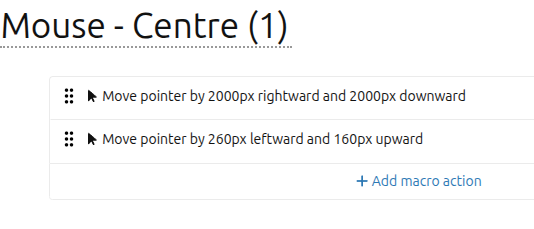
Just move the cursor by some absurd distance like 10000,10000 to get to a corner and then by the relevant distance to get to the center etc.
Uhk doesn’t know your screen resolution, so this will not work well if your setup change significantly (switching between different resolution monitors etc)…
Like what Karel said, that’s an easy way to position the cursor. Again, the downside is that you have to tailor it to specific resolutions. The upside is that it’s saved to the UHK, so you don’t have to rely on an actively running app.
You’d first create a macro with actions to move the pointer to at least the full resolution of your monitor (can be greater than your resolution). Then add a second action to move it to the desired position. The macro can be mapped to any key (arrows, etc.), on any layer. You can even have one key to trigger multiple positions (single-tap, double-tap, ifShift, etc.).
So for example, to center the position on 4k resolution:
The first action would be to move the pointer to the bottom right corner; at least (X: 3840 pixels, Y: 2160 pixels).
The second action would be to move the pointer back up and left (X: -1920 pixels, Y: -1080 pixels).
If you use any display scaling other than 100%, you’ll have to adjust the number of pixels to compensate.
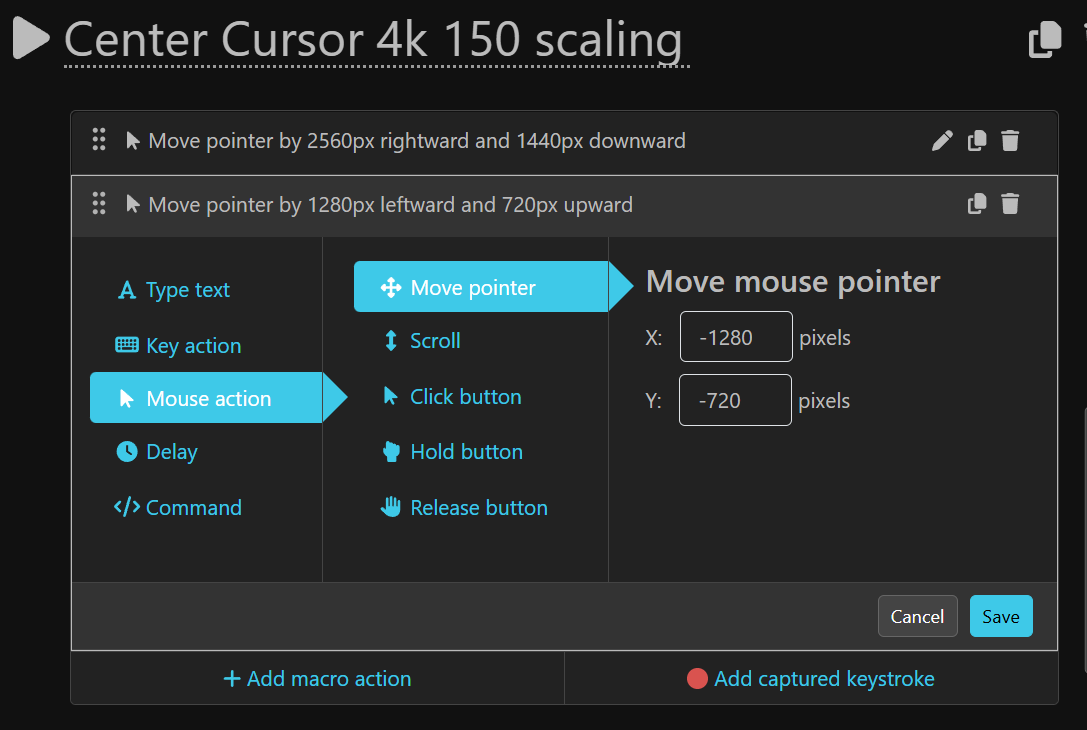
I use 4k resolution with 150% display scaling, so to compensate:
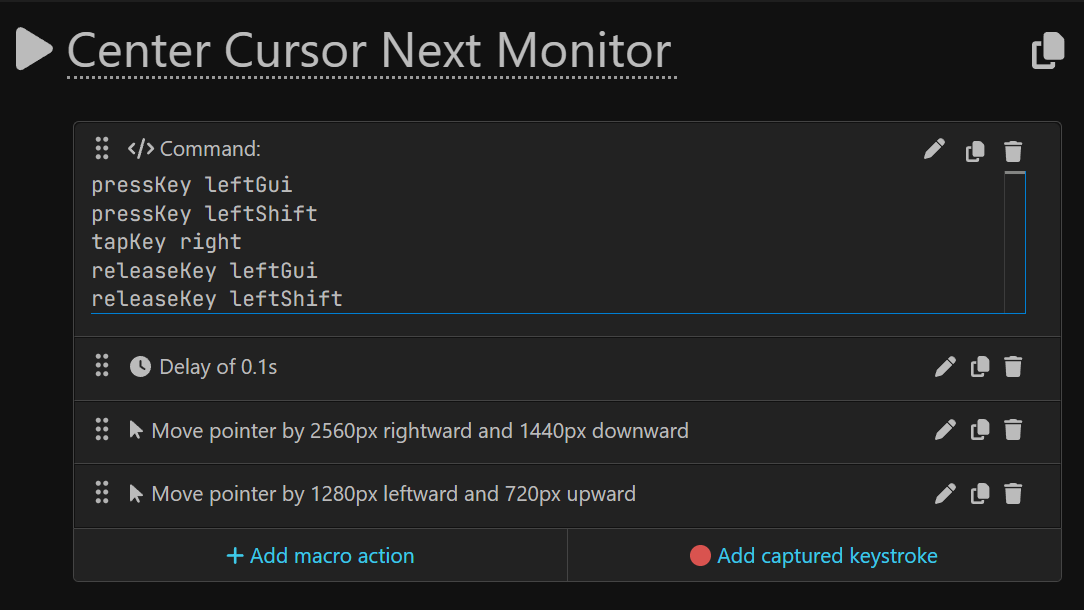
The first action would be to move the pointer to the bottom right corner; at least (X: 2560 pixels, Y: 1440 pixels).
The second action would be to move the pointer back up and left by (X: -1280 pixels, Y: -720 pixels).
You can use the same method above for moving the position to the top, bottom, sides, corners, etc..
With a multi-monitor setup, you’ll need to adjust for that as well. I only have one monitor ATM, so I can’t experiment with directly switching to the center of specific monitors. Although I imagine you should be able to craft a macro that includes the OS keyboard shortcuts to switch monitors, and then move the pointer, all in the same macro.
IIrc, in Windows, the keyboard shortcut to switch to the previous/next monitor is Win+Shift+Left/Right Arrow.
So, something like the following would switch to the next monitor, and then center the pointer:
If you use “Mouse action” —> “Move pointer” X/Y values greater than 4096 pixels, it will throw the position off by quite a bit, recursively. It’s been a very long time since I’ve used this macro, so Idk when the issue began.
Is there a similar macro command to move the pointer by a specific number of pixels?
Maybe the word recursive was a poor choice. I meant that if the first corner jump is greater than 4096px, the cursor will not land in the same place on the screen with each successive tap of the macro, but the amount/direction by which the pointer position is “off” seems consistent. The cursor always lands properly in the center if I keep the first jump’s number of pixels anywhere between the currently selected and max resolutions (as it should).
I just realized that my native screen resolution is 3840 x 2160, but it has the option to go up to 4096 x 2160. So I guess for whatever reason, going beyond the max resolution in the first corner jump is what breaks it. I’m also using a TV, so maybe Windows doesn’t handle things the same as a normal monitor? Unfortunately I don’t have another monitor available ATM to check if there’s a difference.
I have mouse acceleration turned off in my OS, so I don’t think that’s the problem.
Anyway, seems unlikely to be a UHK problem, so that’s good.
 .
.



 Unfortunately I don’t have another monitor available ATM to check if there’s a difference.