My UHK80 enter keys will stop working - several times a day. By “enter keyS” I mean both the actual “Enter” key on the RHS and also the key on the added LHS key cluster that I have mapped to “Enter” via Agent.
Clicking the RHS reset button always instantly fixes it.
(To me either of those symptoms means it isn’t the result of a dirty key.)
This just started happening maybe 3 or 4 weeks ago? Keyboard firmware is 16.2.0 both LHS&RHS. (Key cluster is 13.0.2.) (Though when it started happening it was on a previous firmware, I upgraded firmware immediately after I first noticed it.)
Upgraded to 16.3.0 - problem remained. Downgraded to 16.0.0 - problem remained.
So I just tried flashing 15.3.0 and it’s dead. Sometimes it flashes “factory reset” or something like that, but now it doesn’t even do that. Display is dark. (This is with hardwired USB of course.)
Is there a recovery procedure for UHK 80?
(I’m typing this on my -60 so I’m not totally bereft. Just mostly.)
I’m pretty sure this is the userconfig I’m using, though it is from Jan-2026. The actual keymap that I’m using is called “P16 UHK80” .
Hang on! I sat back, pounded down two diet cokes back to back, and started breathing again. And then I discovered Unbricking the right keyboard half - Ultimate Hacking Keyboard so I’ll try that and report back. (But you could still take a look at that config and see if anything strikes you about it?)
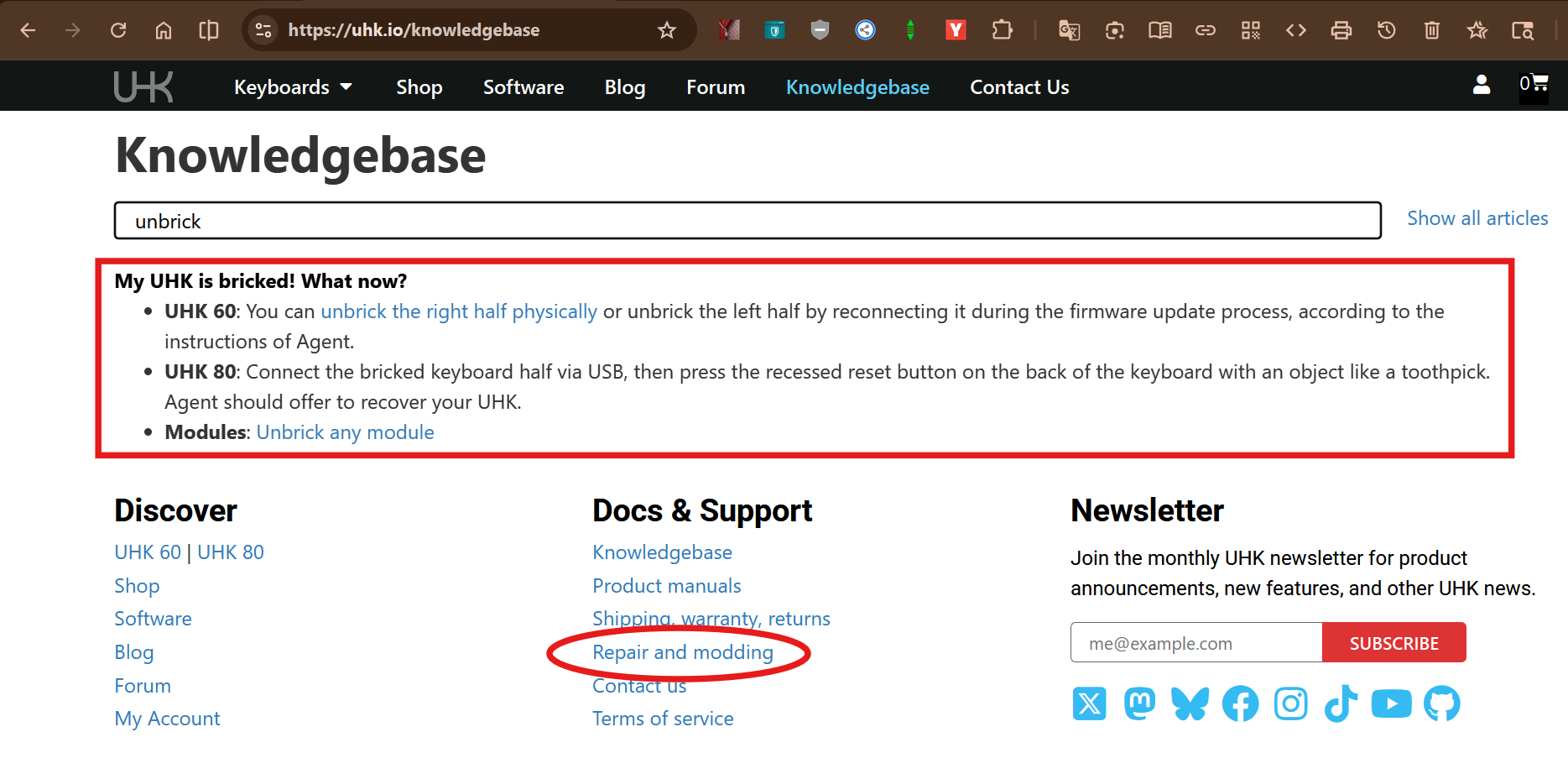
OK, got it back! But the instructions I used were from the FAQ not the KB article “unbricking the right keyboard half”. That seemed, on studying it, specific to the -60. And the “disassemble your RHS” linked to a page that was definitely the -60.
OTOH the FAQ said “UHK 80: Connect the bricked keyboard half via USB, then press the recessed reset button on the back of the keyboard with an object like a toothpick. Agent should offer to recover your UHK.” and that worked instantly. But I almost didn’t find it.
Documentation/KB suggestion: Update the unbricking instruction page to specifically talk separately about the -60 and the -80.
Anyway I’m quite relieved now that the keyboard is working again. I probably still have the original problem, too soon to tell. But what I just did was to update the keyboard from the keymap I’m using, just in case it got garbled somehow. If you hear from me again on this thread you’ll know it didn’t work to solve my vanishing “enter” problem.
I did subsequently see another post here (forget which one, sorry) which explained about the reboot macro command - and now I’ve got that simple macro mapped to a key I never use for any purpose (Mod-ScrLk) and I just hit that and watch the display change and in less than 3 seconds I’m back in gear. That tip should be in the FAQ too!
But navigating from the “Docs & Support” section → “Repair and modding” link, → “Repair - General” section → “Unbricking the right keyboard half” link takes you directly to the “Unbricking the right keyboard half” page for the UHK60. That page should probably also include info for unbricking the UHK80.
Situation critical: Still happening!! Like, every few minutes now.
BTW, this situation with my keyboard is definitely getting worse: Enter key cuts out. BUT NOW I can describe what happens a bit better:
At some point in time while I’m typing the keyboard starts sending continuous Enter. (Very annoying!) It does NOT seem to be related to my actually hitting the Enter key at all! And then to stop that - the continuously sending Enter - I hit Esc. That stops it. And then the Enter key is dead until I hit the REBOOT macro I have bound to a key. All other keys still work though.
This is RH + LH firmware 17.00; key cluster firmware 13.0.2. (The Enter key is dead on the cluster as well as the main keyboard when this happens. Reboot fixes both.) Configuration attached.
Also, Windows 11 25H2 OS Build 26200.8457. Rebooting Windows does not clear this up.
Doesn’t seem to me to be mechanical, e.g., dirty key. Reboot definitely clears it up for awhile each and every time without fail and without any tapping/jiggling/jostling/blowing or any other manipulation of either Enter key.
Removing the key cluster seems to have stopped the problem - 24hrs in on that. I’m now trying a different key cluster.
(Original key cluster has firmware 13.0.2. It never updates when the keyboard is flashed (though attached - obviously! - to the keyboard when I flash it and the flash program’s log knows that it’s there. Why doesn’t it update? I’m asking because I notice that the other key cluster I’m trying now is at 16.1.1.)
I don’t think the UHK80 has implemented the ability to flash modules yet. Try updating it with your UHK60 (if you haven’t already tried that).
I’d try thoroughly cleaning the module’s connection contacts and the board’s pogo pins. It may also be worth trying to realign the steel guides to make sure it’s not losing connection.
 But the instructions I used were from the FAQ not the KB article “unbricking the right keyboard half”. That seemed, on studying it, specific to the -60. And the “disassemble your RHS” linked to a page that was definitely the -60.