Hey folks,
Wanted to show off one way in which I find the UHK’s extensibility super helpful (particularly regarding its ability to trigger macros from your computer). I wrote this blog post that tries to showcase and detail this, including a video of me using it; if a picture is worth a thousand words, than a video is worth a thousand pictures. And I’m not sure how good my words are at describing this 
The uhk-related tl;dr is that I have a program (“wnl”) I use to improve my own terminal-oriented workflow. I use UHK macros to dynamically illuminate and de-illuminate shortcut keys, and to show terminal command exit codes on the UHK’s display. While I could still have the same overall workflow without the UHK, these elements add a whole lot of polish and usability to the setup imo. Love my UHK.
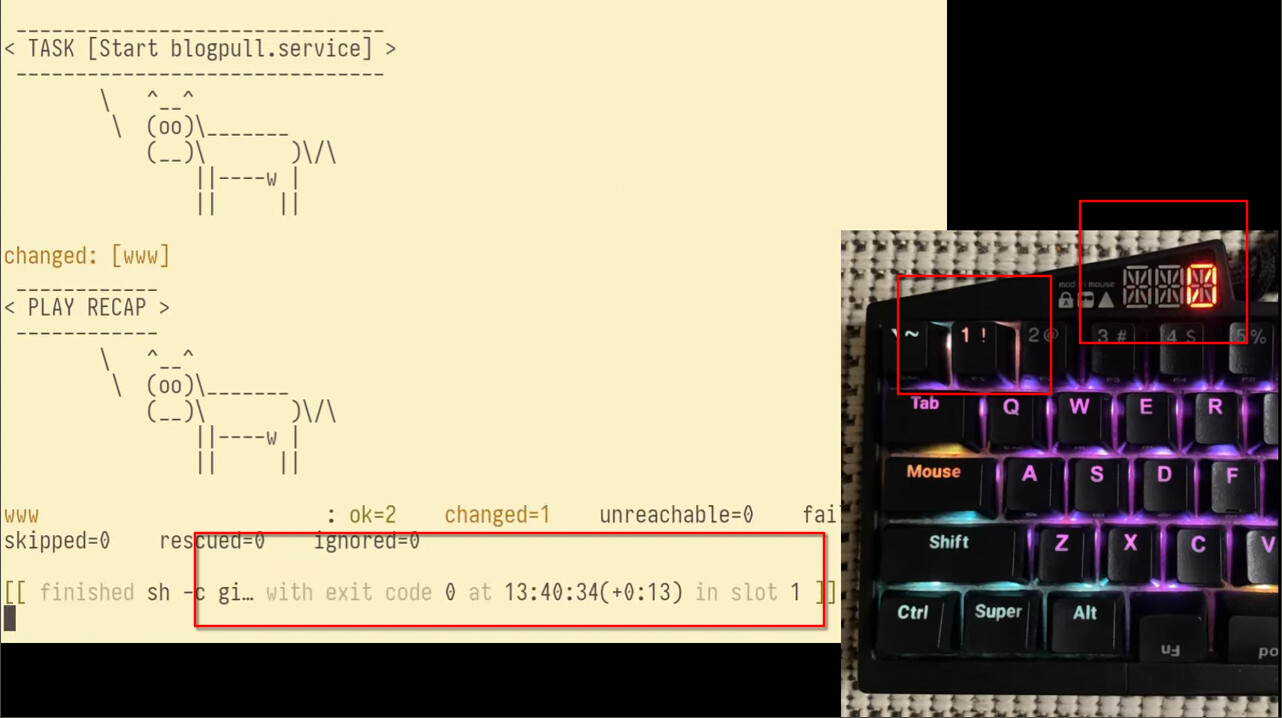
It’s worth noting that, if anyone is interested in a similar setup with wnl, it should™ be easy to get started with. The finer points of integrating with the UHK take a little more effort. I think I’ve documented them adequately in my blog post, but I could very possibly have missed stuff of course.
Idk how many other people out there have a similar sort of thing they’ve made themselves or otherwise have thoughts on this. But the odds can’t be too bad in a nerdy, friendly keyboard forum like this
Somewhat more detail
wnl in a (nut)shell
So basically, I work largely in the Linux terminal (sysadmin/programmer). Largely, I love this, and find the “Unix as IDE” concept to be a great way to work. However, the out-of-the-box lack of global shortcuts is a real limitation. To address that limitation I made a little program called wnl whose goal is to help you have global shortcuts for shell commands that you can set dynamically/on the fly. This is described in the wnl README and shown in my blog post, but basically using wnl goes like this:
- Pick a command that you want to have a shortcut for (e.g.
make test) - In your shell, run
wnl make test - In another shell instance, run
wnlctl, thereby triggeringmake testto run in the first shell- You can also run
SIGNAL=USR2 wnlctlto terminate the triggered command, just as if you had hit ctrl-c
- You can also run
- Use you desktop environment/window manager/whatever to bind global keyboard shortcuts to run
wnlctl
wnl also has a concept of “slots” that allows you to run multiple instances of it. To trigger slot 1, you run wnlctl 1. To trigger slot 2, you run wnlctl 2. And so on. You can then set up keyboard shortcuts for multiple slots.
Leveraging the UHK
Keymap
I put my number keys on a non-base layer, freeing up the number key row on my UHK60v2. Like I say in my blog post, those get bound to ctrl-super-shift-F{number}. Those are set to trigger their corresponding wnl slots, e.g. the 1 key runs wnlctl 1. By further mapping my backtick key to alt, I can also map backtick-1 to SIGNAL=USR2 wnlctl 1 to terminate whatever is running in slot 1.
Of course, this ability isn’t specific to the UHK, but applies more broadly to a remappable keyboard.
Macros
This is where the UHK really shines. Detailed more in my blog post, but I hacked things together such that:
- By default, all the number keys have their backlight turned off
- When I run
wnl(“binding a command to a slot), that backlight for that slot’s button is turned on. E.g. if I runwnl 2 make test, the number 2 key will light up - Whenever a command finishes running, that command’s exit code is shown on the UHK’s display. That code is shown until the next key is pressed.
The backlighting stuff is at its core relatively straightforward, using the set backlight.keyRgb.base.<key> macro. Whereas clearing the exit code from the display upon next keypress was harder; I needed to ask here on the forum for help.