It’s day 2 with the UHK80, I’ve tried Agent out, and I’m overwhelmed. Messing up is a certainty, and I’d like something faster/easier than saving and restoring configurations in Agent. Is there an undo function (like ctrl-z in an email editor)? I also used “snip & sketch” to record Agent’s popup windows when editing a key; that’s clunky and really only good for 1 key. Ideally I’d like to have Agent open in one window, keyboard checker in another, and then ping pong between the two as I make and undo changes (like 3 or 4 deep) until something works. I feel like restoring a config is more of a backup for when I fup badly.
Restoring config… I think it’s actually quite fast, and it auto-saves a backup on each “Save to keyboard” anyway.
2 Likes
Oh, and in addition, I sometimes commit my config (JSON) to Github…
until something works
Well, for me the real question is why exactly do you need so many undos.
What kind of mappings are you making that you need to trial-and-error until “something works”?
- I often misunderstand written instructions, and discover later that I’ve gone wrong. I need to experiment to determine what a particular setting does.
- Agent has unfamiliar/misunderstood information in its UI (i.e. settings), and I can’t remember them well enough to restore them.
1 + 2 = I can’t undo my edits without starting over from a known working point.
Having a quick undo (operating like a computer memory stack) would help, like ctrl-z helps me write posts like this one.
The work around I’ve come up with is using keymap names like AAA, AAB, AAC, … to incrementally save progress. Pressing the copy button and a quick rename is all it takes. Agent tracks keymaps and removes key settings that refer to keymaps I’ve deleted. It’s an ok solution.
”What kind of mappings are you making …?”
- keymap switching, took me about an hour (+) to figure out (I read the tutorial, Agent’s UI took time to work out). For example, I at first thought the tabs beginning with ‘keypress’ and ending with ‘none’ were additive (they aren’t); they’re mutually exclusive. I experimented to verify.
- remapping ‘escape’ to the ‘mouse’ key while retaining the original (factory) binding ‘double tap to lock’ and ‘keep holding down’ to stay in mouse mode. I read forum postings, user guide, and reference (quickly). I struggle to understand many of the terms used (I imagine permutations of events that most probably correctly assume immediately). Again I experimented, and in this case I went about 6 deep into the naming scheme, failed, and deleted 5 of the scheme saves and retaining the known to work save. I’ll make a thread on this mapping after I do more experimenting.
Summary: Undo would be nice, but spamming and then deleting keymaps is quick and works well enough to make progress.
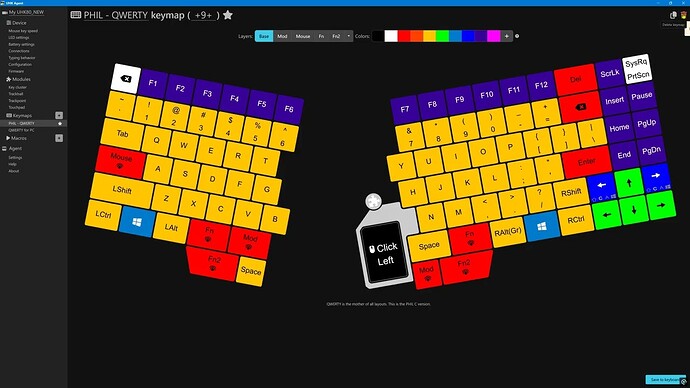
Thank you. Where is this auto-save stored, and is it restored using “Import device configuration”?
3 Likes
Thanks! @pcooke9 Youtube was a bit too fuzzy to read the saved file names, but I could see your actions clearly, and I can duplicate them on my pc. I thought one had to use the import button, but you just clicked, and the config loaded. Nice! Helpful.
1 Like
Where are the saved config files located? Windows explorer search returned “nothing found”. There are around 40 files that I’d like to clean out.
Better, is there a place other than asking on the forum? I looked around and didn’t see anything.
Looked at Agent’s install folder, …/uhk-agent, but nothing there.
“C:\Users\UserName\AppData\Roaming\uhk-agent\user-configs”
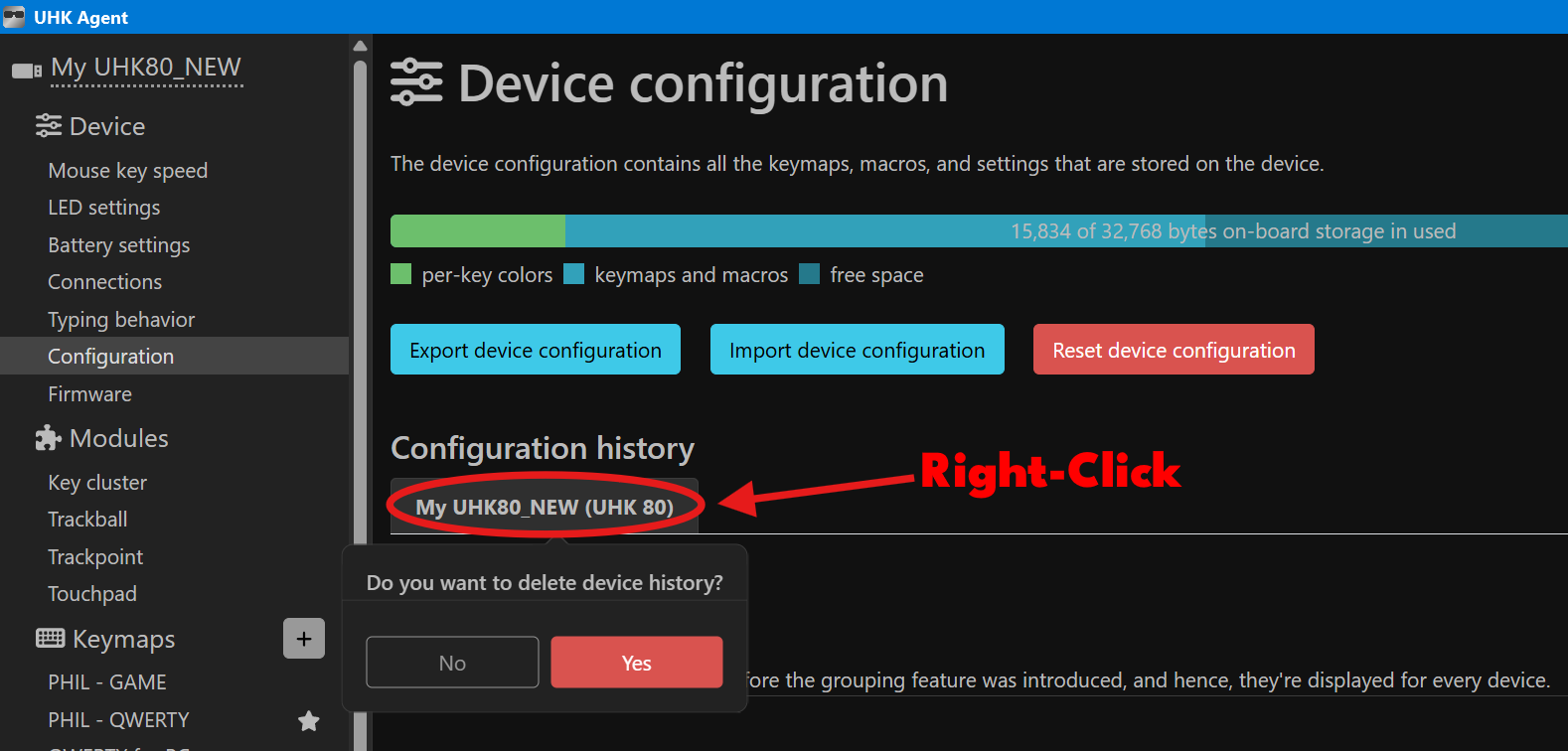
The manually exported UserConfiguration files are stored in the “.json” file format, but the Configuration history files are saved with the “.bin” file extension. You can delete individual bin files from the above directory, or you can clear them all at once from within Agent by right clicking here:
For basic questions, this forum is probably the best bet. The UHK devs are very active here, so you’ll likely get a reply within a few hours of posting most of the time. There’s unofficial Discord and Reddit, but they’re pretty quiet most of the time tbh.
3 Likes
Thank you! I found the folder. My searches failed because I was searching 25-12-04 when it should have been 251204. I see how the file names a constructed now.
The AppData\Roaming\uhk-angent\user-configs\* folders only contain *.bin files (config history), but the \uhk-agent\ folder itself contains a couple of *.json files that I didn’t intentionally export. I’m curious to know what triggers their creation (I might want to access them some day).
Apologies, I phrased my question poorly. People on this forum have been great. Besides the knowledge base, user guide, and reference guide (where I didn’t see mention of file system paths for things like config folders), is there some other resource (short of examining the code on GitHub) one can go to look up things like ~/.my_uhk_config (I made that up) file locations?
Do you have more than one UHK?
I can only make a guess here, but on my system it seems there’s one json file per UHK. It’s my assumption that it’s created with the last saved state, as it’s naming and time seem to correlate with the “AppData\Roaming\uhk-angent\user-configs” subfolders and the last .bin history file created when saving.
Anyway, Idk if that’s helpful  . Maybe someone who actually knows what they’re talking about will clarify.
EDIT: I just noticed that the Appdata json files and user-configs subfolder titles are the UHK’s serial numbers. You can view the serial number for each UHK by hovering over the Configuration history tab that I circled in red in the image of my last comment.
1 Like
You can view the serial number for each UHK by hovering over the Configuration history tab that I circled in red in the image of my last comment.
You have just made my day, I didn’t know this  .
.
2 Likes
It was an accident 
Yep. That qualifies as helpful. 
“You can view the serial number for each UHK by hovering over the Configuration history tab“
 Nice!
Nice!
And, as you explained the two *.json files in uhk-agent match the two tabs.
And, the first UHK I received needed returning, had its pcb replaced (different serial number probably). Matches the multiple UHK hypothesis.
You’ve solved the mystery. Congratulations! And, now I know why I have two tabs in my configuration history on Agent.
1 Like