Hello team, I’m using UHK80 from Windows 11.
I noticed bluetooth reconnection is not working after when to wake up from sleep.
Windows shows UHK80 is alreay paired, but display from UHK80 shows disconnected state.
I found there was issue at past with exactly same issue I’m facing now;
Unable to wake up - UHK 80 - General - UHK forum
UHK80 with Windows is in disconnected state after waking up from sleep · Issue #1060 · UltimateHackingKeyboard/firmware
I found there is link for firmware update from above links, but github shows 404 and I cannot confirm above link now.
I’m using latest version of firmware (15.3.1), I think patch for the issue was missing from latest firmware version.
I would like to ask for how to fix this issue, and also I wanna ask who has same issue.
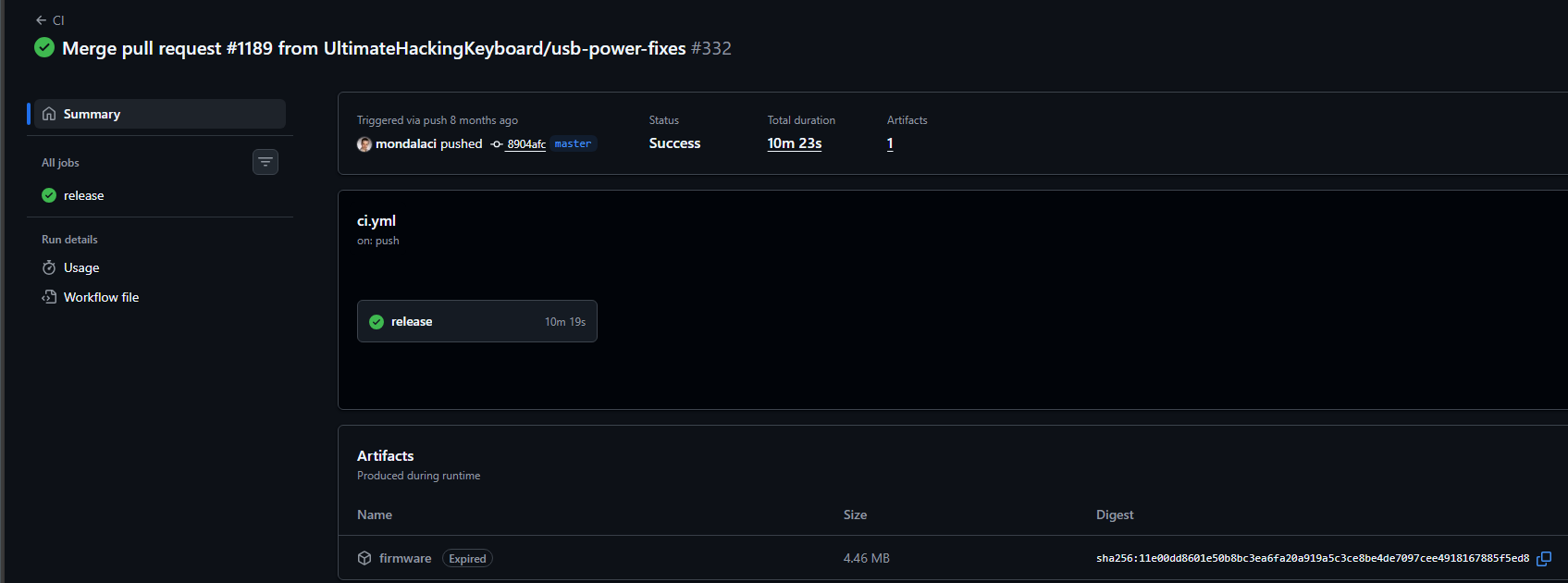
If you mean this artifact: https://github.com/UltimateHackingKeyboard/firmware/actions/runs/14422644330/artifacts/2933383354 then it can be downloaded from Merge pull request #1189 from UltimateHackingKeyboard/usb-power-fixes · UltimateHackingKeyboard/firmware@8904afc · GitHub , and you probably need to be logged into github in order to do so.
I believe the patch was merged into master, which means that it is part of 15.3.1, so this is either another bug, or a new bug that made that linked fix not function.
Probably best next step is to open a new github ticket and have Benedek take a look.
It would also be good to see right half logs - reproduce the behavior with UHK connected to the affected PC over BLE, while also having it connected over USB to another PC and gathering logs ( guide to open the zephyr logging interface How to report firmware issues? - Ultimate Hacking Keyboard ).
Unfortunately, I cannot download firmware either even if I did log-in github since the firmware shows expired to me, and there was no any of firmware download link from your link.
Anyway, I have some good or bad news for this issue.
I noticed bluetooth reconnection is taking 20 to 30seconds at average, however it sometimes taking over 2minutes to reconnect from SFJL wake. I thought reconnecting itself is the issue.
I’m not sure taking 20-30 seconds to reconnect is an expected behavior, and I have no clue why sometimes taking long time to reconnect.
I tried to pull logs from your logging guidance, but there was no any of log piled from agent.
Bluetooth logs quite extensively. If you watch the log while connecting/reconnecting/whatever, you should definitely see logs.
(You have to enable them from Agent. If you reboot UHK, then the setting which tells UHK to gather and send logs to Agent over USB may get resetted and you may need to disable and enable it again from Agent. You should not need to reboot the UHK though, as your initial post doesn’t indicate you putting the keyboard into any kind of deep sleep. Mentioned sfjl lock mode may or may not be a deep sleep depending on how you suspend it there.)
I’m trying to log & reproduce issue. I have 2 of windows 11 PCs and here are the steps what I had done.
- Connect BLE to PC A. no USB wire connected.
- To make a log, I connected PC B with USB wire while UHK connected PC A with BLE.
I confirmed BLE connection to PC A stayed while USB wire connected with PC B.
- At this USB wired moment, I pushed [FN2+Pause] keys to change status as sleep mode, and confirmed UHK went to sleep mode as expected.
- And as a next step, I did SFJK wake up. However this action goes to USB connection status which is connecting PC B, not PC A with BLE mode.
- After step4 above, I pulled out USB cable. UHK goes to brick-like status. Why I’m saying this status as brick-like, at this moment, SFJK waking up action was not working anymore, and only pushing [FN2+Pause] shows lights to SFJK keys.
To get exact log from BLE connection, I think connection changing to USB connection from BLE should be blocked. How can I set higher priority/to make UHK stay to BLE mode when to pull out USB cable?(*Step4 above)