Anyone switch from QWERTY? What did you go to, and how did it go?

I have pondered switching from QWERTY for a while, particularly inspired by this guide to alt keyboard layouts (why, how, which one?), which is excellent and great reading.

But I figure I’d probably leave it until after I move to an ortholinear or column-staggered layout, so I haven’t seriously through of taking the dive while I am on my UHK60. Then I saw this video Dygma put out. And I’ll admit that it made me think twice.

Cross-checking Engram on that webpage, it seems like he is right and the ‘Pinky off’ metric is the highest of all the alternatives. It sounded like a lot of work to switch and I’d hate to put in that commitment to find I’d overlooked something.

Just curious if anyone here made the switch, especially if while using their UHK. What did you switch to, and how is it going?

I switched to Colemak about 8 years ago. Never looked back. It’s so much more comfortable. Less hopping all over the place when typing. Calmer hands. Did this on regular row-staggered, non-split keyboards. When I got my first UHK, I was already typing Colemak. Later I also tried some columnar-staggered keyboards, of course still using Colemak.

I have all my keyboards, laptops, PCs, and even my tablets and Android phones switched over. Colemak is now available on all OS (Windows, MacOS, Linux, Android, ChromeOS) as a standard keyboard layout. That’s for me a major benefit vs. other alternative layouts. QWERTY is banned from my life. If I had children, I would give them Colemak keyboards. Why force anyone to learn an inferior layout?

I used the “tarmak” route to Colemak. With tarmak, you move from QWERTY to Colemak in stages. In each stage, only a few keys change. You continue to use it and start making typos, but start adjusting over maybe a week, or two, or three. Whenever you are at a sufficient speed and accuracy again, you switch to the next stage. After 4 stages, you are on Colemak.

You can have debates over which alternate layout is best. The truth is, basically anything is better than QWERTY. Pick Colemak, Dvorak, Engram, Graphite… lots of poisons available. The difference between these is diminishing. For me the deciding factor was to use one that is universally available across environments.

Your use case may be different. Perhaps you work only on one single system and have full control over its setup, or you always bring your own remappable keyboard. Then you can choose whatever pleases you, because you will always have your layout.

Enjoy the ride! :slight_smile:

1 Like

I made my own layout somewhat recently.

For me, it was worth it. I had discomfort which went away. What Dygma mentions about the pinky is definitely relevant, but realistically just one aspect of the bigger issue: contorting your wrist. I took active measures when I made my layout to avoid this. It is worth noting, though, that you can also do other things to help with that. You can try to change how you press keys, maybe try to unlearn bad habits, but it will only take you so far if the key really is out of comfortable reach.

I chose to design my own layout by moving the Qwerty US layout keys around for a couple of reasons, but mostly it was that then it’s contained to that keyboard. It’s compatible with almost everything, just plug it in. Some things like Remote Desktop will forward scan codes to the client OS such that you are subject to the client OS layout. If your custom layout is a hardware rearrangement of Qwerty US, that’s MUCH easier to deal with than if your layout is in OS interpretation of scan codes since it will almost certainly be easy to select Qwerty US on the target OS.

For learning the new layout, I just spent a bunch of time on Monkeytype in my spare time until it started to break my ability to type Qwerty. Then I switched full time. Took a few months before I stopped dreading typing in chats and started approaching my old Qwerty speeds in Monkeytype, then another few months until muscle memory started to actually match the feeling of familiarity of Qwerty before the switch. Now I’m surprisingly finding that I can almost touch type Qwerty again even though I very rarely use it. The brain is a strange thing.

1 Like

I switched to Dvorak about 2 years ago. I am happy that I did, it feels so much more comfortable to type on than QWERTY. It just feels much better on my hands and as I work on a computer 8 hours a day I find that really important. I’m also a musician so I basically need my hands all day. So that’s why I switched; purely for ergonomics.

I switched while on the UHK. I wanted to use a customized version of Programmer Dvorak, something you can’t easily achieve on a regular keyboard. (See my setup here: Setup: Extended Programmer Dvorak layout ). I learned this through an online typing course and I switched over as soon as I knew enough letters to form a proper sentence.

Yeah, making the switch takes time and energy for sure. I could type on QWERTY with mad speed before I switched and now I can’t type that fast anymore on either layout. But that doesn’t really matter if you can type fast enough to get stuff done.

There’s a couple of things I learned that I wouldn’t have expected beforehand. I wanted to learn Dvorak while keeping the ability to type QWERTY. Mainly because completely banning QWERTY is highly impractical in office situations. At first, keeping them both was really hard, as I tried to switch back and forth on my UHK a lot. However, after a while I found out it is easier for me to type Dvorak on my UHK, and QWERTY on basically any membrane keyboard. It’s like my brain linked either of these layouts to some kind of feel under my fingers and now I can switch effortlessly. So if you intend to keep QWERTY on the side for some reason, maybe that is something to try.

So this is completely opposite to what @maexxx did haha (not that there’s anything wrong with that, it just shows that there’s many ways to go at it :smiley: ). I did not ban QWERTY for life, for practical reasons. I made it my mission to become “bilingual” in that way and it’s going really well. So only my UHK is on Dvorak and everything else is set to QWERTY so I stay fluent in both. It’s hard, but it’s definitely possible! It did take me months to get to a point where that got comfortable, though.
Anyway, good luck on your journey!

1 Like

Something else I thought of: I used this really cool tool to help me decide which layout I wanted to switch to: Keyboard Layout Analyzer - QWERTY vs Dvorak vs Colemak. It provides you will all kinds of statistics on estimated key usage, I find it really cool.

Basically I copy pasted some stuff in there I had recently typed from various contexts (code, chats, emails, documentation, etc.) and also in both the languages I use (English and Dutch). Especially throwing my Dutch in the mix, Dvorak came out as the clear winner for me. But I can only imagine this differs heavily per use case.

3 Likes

I love that layout analyzer, thanks @Buffy2ndSlayer !

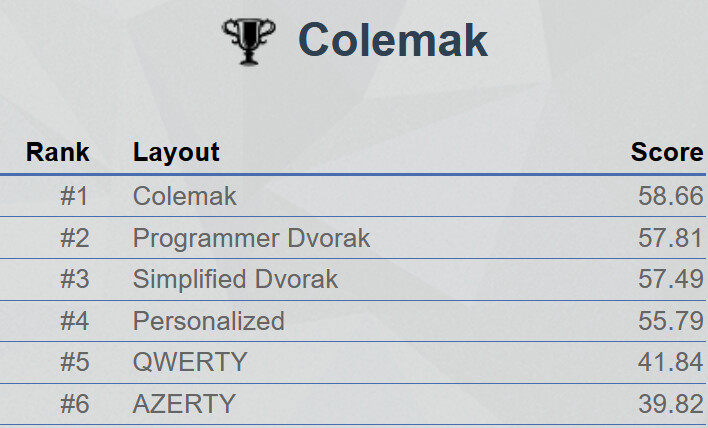
I just threw at it a recent email that I had just composed, and out came:

The stats very much confirm my earlier statement: modern layouts are way better than QWERTY, but then it’s diminishing improvements from there. The differences will be small and will probably depend on the exact body of text that you feed it.

1 Like

I moved to Colemak 8-10 years ago. As above, I haven’t looked back. I learned it much the same way I learned QWERTY, 30 years ago. Online guides make this much easier. But it’s essentially just repeating certain rote key combinations, over and over, until they become muscle memory.

At this point, QWERTY is completely foreign. The key locations seem ridiculous, frankly. And typing on a QWERTY layout makes it apparent just how much the fingers have to move all over the keyboard, all the time.

I took a look at Dvorak, also. The learning curve for that looked to be too high. Colemak does share 10 key positions with QWERTY, and it does also retain certain oft-used keyboard shortcut key positions (cut, copy, paste).

I definitely like having most of the typing being on the home row, and the “rolling” action of the fingers on certain bi-grams, as well as most of the action being on the strongest fingers.

I took a quick look at Colemak-DH just now, because I’d never heard of it. Meh. Loses the advantages of much of the above without gaining much, IMO.

My only quibble, as a programmer, is the location of the semi-colon.

What’s your use case, though? Frankly, the programmability of the UHK makes pretty much any problem go away. You’re not constrained to any layout, so you can account for any problem you might run into.

This, at the expense of being dependent on the tool. I took that tradeoff, and I’d take it again.

3 Likes

The reason Colemak comes out on top of that Analyzer is that there are no newer and better layouts in your list :wink:

For English Graphite/ Gallium are current favorite layouts. They, several others or one of my layouts (anymak:END, En*….) come out on top in similar comparisons when you include them. That said. Do not trust the analyzers. That is a longer story which I will explain on my website in the future in more detail. A first (draft) article is already online:

I will also publish an article what you should check to evaluate a layout. Those are 4 points, where the analyzers is one you should not miss, but be aware of the limitations.

See my post here: anymak:END - my final keyboard layout, why and how :-)

Also scroll down in the thread to 3 articles which can help you to understand what to look for in an alternative layout – if you decide to go for it. IMO this is the last steps one can do, but more important are a navigation and shortcut layer, possibly an extra symbol layer and bottom-row-mods (which I think are better for most people than home-row-mods).

I agree that the usage of layers make a huge difference for the ergonomics of the layout. Basically, there’s only so many buttons on the keyboard which are actually ergonomic to use. Better to use those keys with mod buttons than to put keys at awkward positions.

Regarding home-row mods vs button-row-mods, I absolutely get why you would move them off the home row, but I would argue that it’s very much a matter or taste or hand size. I find the top row more comfortable than the bottom row, for the first three fingers, but I have rather large hands. Even so, of course my pinky can’t reach at all unless I lift my hands.

Also, there have been changes to the Secondary Role Keys on the UHK lately, aimed at making HRMs easier to use. Have you tried those out?

2 Likes

I agree that the top row can be (and is likely) easier to reach for many people. But most layouts, including QWERTY) put high frequency keys on the top row. So the timing problem you have is still there, maybe a bit less pronounced like on the home-row, but still…

In contrast for most layouts, especially alternative keyboard layouts you asked for, have the lowest frequency on the bottom row. That makes it the better place IMO to put the mods. So actually I do not need fancy rules and firmware hacks to make the bottom-row-mods work for me. That is exactly the point. :slight_smile:

Even when you use “chordal hold”, “require-prior-idle-ms” and other firmware tricks you will still need to tailor them to your typing speed and get some practice. Still it will fail at times. HRM only work well for one timing style. But you will likely type faster on some days, slower when tired, differently when coding vs. writing prose or differently on laptop vs. desktop keyboard and so on.

So the big benefit of using the row with the least frequent key is to make the timed approach to work without much less hassle. Is it harder to reach than the top row? Yes! That is good. Because you deliberately reach down the small curl with your finger to hold the key to access the modifier. That is a very small price to pay to get dual function approach of one key much more reliable. You do not hammer keyboard shortcuts with 50 wpm anyways. For typing you do not want to get hindered to type with 30 wpm, 50 wpm, 80 wpm or higher (even varying on days or in different situations as outlined above).

BTW, Shift is a special key and not only a modifier. For typing text it is a layer switch and IMO should be best accessed as a one-shot layer, means you need a dedicated key (see the linked articles on kbd.news).

Those are my 2 cents :smile: